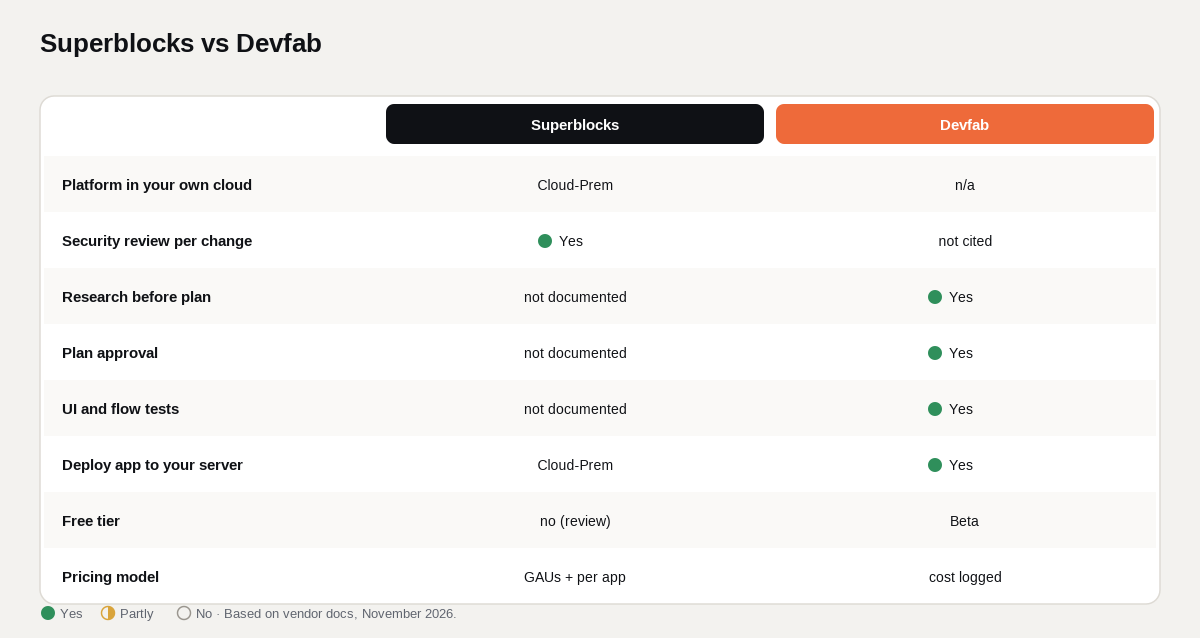
Short answer: Choose Superblocks when a large enterprise wants many semi-technical builders making internal apps with an AI agent, under central IT policy, with the stack inside its own cloud. Choose Devfab when you deliver client projects end to end: research, an approved plan, agents that build and test, and deployment to each client's server.
Two kinds of buyer read this page. One is an enterprise IT lead with hundreds of people who want to build apps, and a security team that wants every change reviewed. The other is a delivery team shipping projects to many clients, each with its own scope and server. Superblocks is designed for the first. Devfab is designed for the second. Here is where each wins, with sources.
In this comparison:
- What each tool is built for
- Switching triggers
- Cost model by team size
- Where Superblocks is the better choice
The rest of the page covers them in order.
What each tool is built for
Superblocks
Superblocks is an enterprise platform where business and engineering teams build internal apps with an AI agent called Clark, under central IT governance. Its own line is "built for both builders and the teams that govern them at scale".
Status: Superblocks 3.0 was announced on August 3, 2026, with an AWS strategic partnership. Superblocks 2.0 came on April 15, 2026, adding Clark's memory and VPC deployment on AWS. One oddity: Clark's docs page still says "Clark is currently in private beta", which conflicts with the later announcements.
What it offers:
- Clark: chat to generate an app, refine it in a visual editor, then extend it in code by "editing the underlying React framework". Clark remembers code policies, design systems, audit rules and data mappings.
- Security review: specialized security agents and deterministic scanners review each code change. 3.0 adds Custom Policy Agents, a private package registry, and SBOM and CVE scanning per app.
- Where it runs: Superblocks Cloud, Hybrid (control plane with Superblocks, data in your cloud), or Cloud-Prem inside your AWS, GCP or Azure account.
- Bring prototypes in: Builder MCP lets builders iterate from tools such as Slack or Cursor, and 3.0 imports prototypes from tools such as Lovable, Replit and raw code.
- Models: approved models from AWS Bedrock, GCP Vertex AI, Azure AI, Snowflake Cortex and Databricks, with a Smart Router.
- Admin and compliance: RBAC, SSO, always-on audit logs, ephemeral isolated containers, SOC 2, GDPR and HIPAA-eligible deployments. Git integration covers GitHub, GitLab, Bitbucket and Azure DevOps.
Superblocks' main user is a high-compliance enterprise with many internal builders.
Devfab
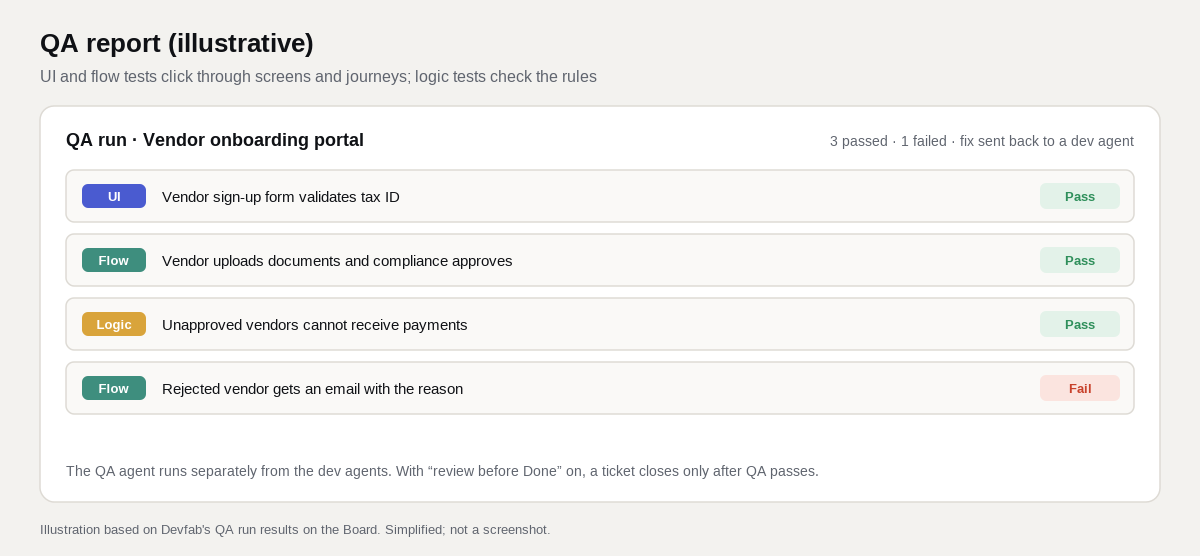
Devfab is an AI software factory for client projects, run by seven agents. The Researcher maps the domain first: key terms, best practices and competitors, then suggests a prototype. The Planner writes the plan and a person approves it before the Coordinator creates tickets. Developers work with ChainFlow, which maps which functions and APIs call each other so a change doesn't break connected features. Blueprint draws screens, the QA agent runs UI and flow tests plus logic tests, and Deploy ships to production on your own server.
You can choose the model for each agent or keep Devfab's default. Code lives in your own GitHub account (or your organization's).
Coding agents automate the developer. Devfab automates the development lifecycle.
Switching triggers
| Trigger | Superblocks | Devfab | Source |
|---|---|---|---|
| You need to try it before a contract | A competitor's review says there is no free tier | Devfab is in Beta; try it or book a demo | Jet Admin review (competitor, Sep 2026) |
| Core controls cost extra | The same review lists VPC deployment, SSO, audit logs and source control as Enterprise-only | Roles, workspace permissions and a Team Delivery Report are part of the workspace (Beta) | Jet Admin review (competitor) |
| The invoice is hard to cap | Governed Agent Unit pools can auto-refill, so the base subscription may not cap the bill | Cost logged after each run, per task and per project | Superblocks billing docs; Jet Admin review |
| The client wants a product, not an internal app | Built for internal apps under IT governance | Research, approved plan, tickets, QA and deploy for any web app or API | Superblocks 2.0 post |
| You need functional tests, not only security scans | Security agents and scanners review each change; functional UI testing is not covered in the docs we checked | QA agent runs UI, flow and logic tests | Superblocks 3.0 post |
| Product status is unclear | Clark docs still say private beta | Devfab says plainly it is in Beta | Clark AI docs |
Cost model by team size
| Team size | Superblocks | Devfab |
|---|---|---|
| 1 person | Teams self-serve plan with an org-wide Governed Agent Unit (GAU) pool; no free tier per a competitor's review | Cost logged per task and per project (Beta) |
| 5 people | Teams plan: shared GAU pool, packs, auto-refills and per-user spend limits, plus a charge per published app per month | Cost logged per task and per project (Beta) |
| 25 people | Enterprise dollar-commit contract; GAUs plus per-app charges, with no per-seat builder or end-user fees | Cost logged per task and per project (Beta) |
Check Superblocks' billing docs for current terms.
Moving from Superblocks to Devfab
Teams usually keep Superblocks for internal apps and use Devfab for client products. To rebuild one app as standalone software:
- Find the source. Superblocks source control versions applications, workflows and scheduled jobs in a GitHub or GitLab repo, with branches and pull requests. Those files run on Superblocks, so treat them as a reference.
- Keep the data. In Hybrid and Cloud-Prem setups, data already sits in your cloud.
- Connect any standalone code. If services around the app live in GitHub, choose "Work on an existing project" in Devfab, pick the repo and leave the change box empty. ChainFlow maps the code first and suggests three small first tickets.
- Or start a new project and attach screenshots and the data model as the spec.
- Approve the plan, then let the Coordinator create tickets.
- Let the QA agent test UI, flows and logic, then deploy to the client's server.
Where Superblocks is the better choice
- Security requires everything inside your cloud, including AI inference, as with Cloud-Prem on AWS with Bedrock.
- Many semi-technical builders need one central policy layer, with no per-seat builder fees on the enterprise licence.
- Every change needs a security review, with policy agents, SBOM and CVE scanning.
- You are consolidating prototypes from other AI tools into one IT-approved path to production.
- You need compliance paperwork now: SOC 2, GDPR and HIPAA-eligible deployments.
Where Devfab is the better choice
- You deliver projects to many clients, each with its own scope, repo and server.
- The domain needs research first. The Researcher maps terms, best practices and competitors before planning.
- The client approves scope. A person approves the plan before agents build.
- You need functional proof. The QA agent clicks through screens and user journeys and runs logic tests.
- You change an existing codebase. ChainFlow shows what a change touches, such as checkout affecting payments and notifications.
- You report per project: QA report, user manual, Team Delivery Report and cost per task.
Devfab's honest limits: it is new and in Beta, with a smaller community and fewer integrations than Superblocks. This page cites no compliance certifications or in-VPC platform deployment for Devfab; if you need those today, Superblocks documents both. It is not an editor for hands-on coding, and it needs a GitHub account.
FAQ
What is new in Superblocks 3.0?
Superblocks announced 3.0 on August 3, 2026, with an AWS strategic partnership. It added in-VPC deployment with Bedrock inference, security agents and deterministic scanners that review each code change, SBOM and CVE scanning per app, and a Smart Router that sends sub-tasks to different models.
Superblocks reviews every change. Isn't that the same as Devfab's QA agent?
No. Superblocks' review is security-focused: agents and scanners check each code change against policies. Devfab's QA agent tests behavior: it clicks through screens and user journeys and runs logic tests. A regulated team may want both kinds of check.
Does Superblocks have a free plan?
A September 2026 review by Jet Admin, a competitor, says there is no free tier. Superblocks bills AI work in Governed Agent Units plus a charge per published app. Devfab is in Beta with predictable cost: cost is logged after each run, per task and per project.
Which is better for an IT services firm?
If you place builders inside one large client and their security team needs everything in their own cloud, Superblocks fits. If you deliver separate projects for many clients and need research, plan approval, QA reports and deploys to each client's server, Devfab fits.
Read next
- What is an AI software factory?
- Superblocks alternatives for teams that ship to production (2026)
- Retool vs Superblocks: which should your team use in 2026?
- AI code review vs QA agent: what each one catches
See a client project tested and shipped. Book a Devfab demo
Sources (checked November 13, 2026): Superblocks 3.0: secure private vibe coding on AWS (Aug 3, 2026); Announcing Superblocks 2.0 (Apr 15, 2026); The AI-native enterprise tooling stack (Superblocks, Mar 2026); Clark AI docs; Superblocks billing overview; Superblocks self-serve plan; Superblocks source control overview; Superblocks Review 2026 (Jet Admin, a competitor, Sep 2026).
Frequently asked questions
What is new in Superblocks 3.0?
Superblocks announced 3.0 on August 3, 2026, with an AWS strategic partnership. It added in-VPC deployment with Bedrock inference, security agents and deterministic scanners that review each code change, SBOM and CVE scanning per app, and a Smart Router that sends sub-tasks to different models.
Superblocks reviews every change. Isn't that the same as Devfab's QA agent?
No. Superblocks' review is security-focused: agents and scanners check each code change against policies. Devfab's QA agent tests behavior: it clicks through screens and user journeys and runs logic tests. A regulated team may want both kinds of check.
Does Superblocks have a free plan?
A September 2026 review by Jet Admin, a competitor, says there is no free tier. Superblocks bills AI work in Governed Agent Units plus a charge per published app. Devfab is in Beta with predictable cost: cost is logged after each run, per task and per project.
Which is better for an IT services firm?
If you place builders inside one large client and their security team needs everything in their own cloud, Superblocks fits. If you deliver separate projects for many clients and need research, plan approval, QA reports and deploys to each client's server, Devfab fits.