Short answer: Choose Devin if you want to hand well-scoped tickets from Slack, Linear or Jira to an agent that works in its own cloud machine and returns pull requests. Choose Cursor if your developers code by hand every day and want planning, agents and review inside the editor, with models from several vendors.
The old framing was simple. Devin works alone in the cloud; Cursor works beside you in the editor. In 2026 that line blurred. Cognition renamed Windsurf to Devin Desktop, so Devin now has an IDE. Cursor runs cloud agents in parallel VMs. So the real question is where your team's work starts: a ticket or an open file. This page is the referee, with sourced facts checked on November 13, 2026.
In this comparison:
- Devin and Cursor at a glance
- Feature comparison
- Cost model by team size
- Where Devin wins and where Cursor wins
- Where Devfab fits
Read it in order, or jump to your question.
Devin and Cursor at a glance
Status changes. On June 2, 2026, Windsurf was renamed Devin Desktop and joined the Devin product line. Cursor's parent, Anysphere, was acquired by SpaceX. Cursor's August 14, 2026 post confirms the deal closed, and its plans now bundle Grok products.
Devin, from Cognition, is "an autonomous AI software engineer that can write, run and test code". Each session gets a shell, an IDE and a browser in its own cloud machine. You can watch it work and take over. You start tasks in the web app, by tagging Devin in Slack or Microsoft Teams, from the Devin for Terminal CLI, or through the API. Devin can split long tasks across subagents that each open their own pull requests. It suits engineering teams working through a backlog.
Cursor is an AI editor plus coding agent, also available as a CLI, cloud agents and SDKs. Plan Mode researches the codebase and drafts an editable plan before any code is written. Cloud agents run in isolated VMs, work on separate branches and push changes. Bugbot reviews pull requests. It suits developers who want AI where they already type.
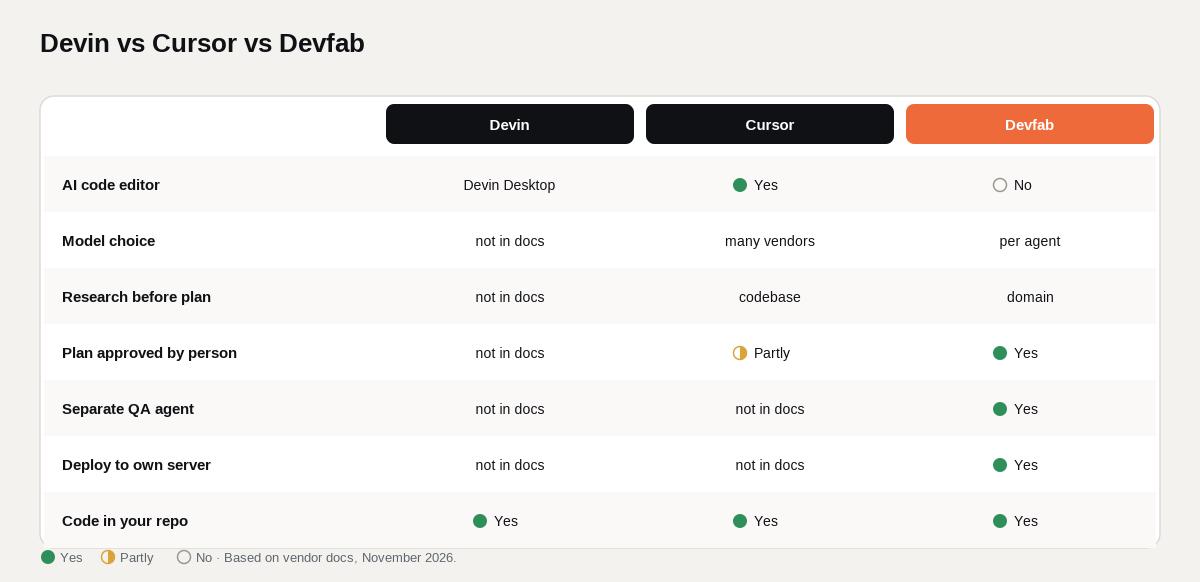
Feature comparison
| Aspect | Devin | Cursor | Source |
|---|---|---|---|
| Where it runs | Web app, Slack, Teams, Devin for Terminal CLI, API; Devin Desktop IDE | Desktop editor, CLI, cloud agents, mobile, SDKs | Devin docs; Devin Desktop; Cursor docs |
| Where work starts | A ticket or message: Slack, Teams, Linear, Jira | Usually the editor; cloud agents also start from Slack, GitHub, Linear or the API | Devin docs; Cursor cloud agents |
| Planning | Works best with clear prompts and explicit completion criteria; harder work split into scoped steps | Plan Mode drafts an editable plan before building | Devin docs; Cursor Plan Mode |
| Agent autonomy | Own cloud machine per session; subagents open their own PRs | Parallel cloud agents, one branch each | Devin Desktop; Cursor cloud agents |
| Testing and review | Writes, runs and tests code; built-in Devin Review | Bugbot reviews PRs; Autofix pushes fixes | Devin docs; Bugbot |
| Deploy and hosting | Not a hosting product; Enterprise offers a single-tenant VPC hosted by Cognition | Not a hosting product; Self-Hosted Machines for cloud-agent tools | Devin deployment; Cursor cloud agents |
| Code ownership | Pull requests to your repos | GitHub, GitLab, Bitbucket and Azure DevOps | Devin docs; Cursor cloud agents |
| Team and admin | Teams (up to 100 users), SSO, multiplayer sessions; Enterprise adds SCIM, RBAC | SSO on Teams; SCIM and audit logs on Enterprise | Devin pricing; Cursor Enterprise |
| Pricing model | Free, Pro, Max, Teams (team fee plus seats), Enterprise in ACUs | Subscription tiers with a usage pool; Teams per seat; Enterprise custom | Devin pricing; Cursor pricing |
Cost model by team size
| Team size | Devin | Cursor | Devfab |
|---|---|---|---|
| 1 person | Free tier with a light agent quota, or Pro and Max with higher quotas; extra usage at API rates | Free tier, or an individual tier with a usage pool; cloud agents need Premium or higher | Cost logged per task and per project (Beta) |
| 5 people | Teams: a team fee plus a per-seat fee, centralized billing, cost controls | Teams, per seat, with SSO and centralized billing | Cost logged per task and per project (Beta) |
| 25 people | Teams or Enterprise; Enterprise usage measured in Agent Compute Units | Teams or custom Enterprise with group spend limits | Cost logged per task and per project (Beta) |
Pricing models as of November 13, 2026, from Devin's pricing page, Devin's usage docs and Cursor's pricing page. Prices change often, so check before you buy.
Where Devin wins
- A backlog of scoped tickets. Cognition lists parallel Linear or Jira tickets, migrations, refactors, bug reproduction and unit tests as good fits.
- Hand-off without opening an editor. A product manager can tag Devin in a Slack or Teams thread and get a pull request back.
- Watching and taking over. Each session has a shell, IDE and browser you can watch live and step into.
- Private connectivity. Customer Dedicated Deployment runs in a single-tenant VPC connected by AWS PrivateLink or IPSec.
Where Cursor wins
- Daily hands-on coding. The editor, Plan Mode and agent chat sit where developers already work.
- Model choice. Cursor lists Claude, Gemini, GPT, Grok and its own Composer.
- Review with automatic fixes. Bugbot flags bugs and security issues, and Autofix can push the fix to a branch.
- More Git hosts and editors. Cloud agents support GitHub, GitLab, Bitbucket and Azure DevOps, and Cursor lists JetBrains and Xcode integrations.
Switching from one to the other
Both tools deliver work as branches and pull requests, so your code is already in your git host.
- Put shared instructions in AGENTS.md. Devin reads AGENTS.md before it starts coding and includes the first 16 KiB of each file. Cursor supports AGENTS.md in the root and subdirectories.
- Bring over tool-specific rules. Devin's docs offer a migration prompt for rules from other coding agents. Cursor-only rules go in
.cursor/rulesas.mdcfiles. - Coming from Windsurf? You are already in the Devin product line through Devin Desktop.
- Pilot on one ticket. Give both tools the same small ticket and compare the pull requests side by side.
Where Devfab fits
Devin and Cursor both make engineers faster at writing code. Neither is built to run a client project end to end, with a plan the client approves and a test report the project manager reads.
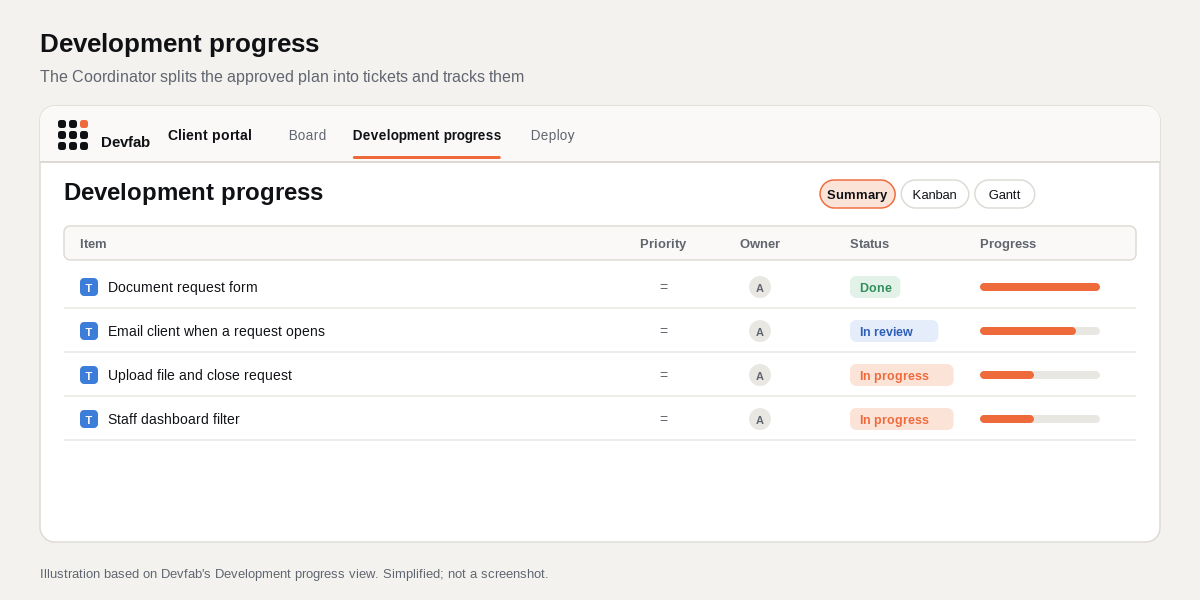
Coding agents automate the developer. Devfab automates the development lifecycle. Devfab's Researcher learns your industry first. A person approves the plan before the Coordinator creates tickets. The QA agent then runs UI and flow tests (screens and user journeys clicked end to end) plus logic tests. Delivery ends with a deploy to your own server and user manuals.
Devfab's honest limits: it is new and in Beta, with a smaller community and fewer integrations than either tool. It is not an editor, and it needs a GitHub account. For side-by-side detail, see Devfab vs Devin and Devfab vs Cursor.
FAQ
Is Devin Desktop the same as Windsurf?
Yes. Cognition's docs say Windsurf was renamed Devin Desktop on June 2, 2026 and joined the Devin product line. It adds a local IDE and an agent command center, with handoff between local and cloud sessions.
Which is better for clearing a backlog of tickets?
Devin is built for it. Cognition lists parallel tickets from Linear or Jira, migrations, refactors, bug reproduction and unit tests as good fits, and you can tag Devin in Slack or Teams. Cursor cloud agents can also run in parallel, but most Cursor work starts from a developer in the editor.
Can Devin or Cursor run fully inside my own network?
Not fully. Devin offers a single-tenant VPC hosted by Cognition, but its docs say the agent's brain always runs in Cognition's cloud. Cursor's Self-Hosted Machines run cloud-agent tool execution on hardware you manage, with models served by Cursor's providers.
Do I have to choose one?
No. Both read an AGENTS.md file in your repo, and both deliver work as branches and pull requests in your own git host. Some teams use Cursor for hands-on coding and send well-scoped tickets to Devin.
Read next
- What is an AI software factory?
- Devin alternatives for teams that ship to production (2026)
- Devfab vs Devin: which fits a team that ships client work?
- Devfab vs Cursor: which fits a team that ships client work?
- AI pair programmer vs autonomous coding agent: what's the difference?
Want tickets, tests and deploys run as one process? Try Devfab Beta
Sources (checked November 13, 2026): Devin Docs: Introducing Devin; Devin Desktop; Devin Docs: Devin Desktop FAQ; Devin Docs: Enterprise deployment; Devin Docs: Usage and billing; Devin Docs: AGENTS.md; Devin Pricing; Cursor Docs; Cursor Plan Mode; Cursor Cloud Agents; Cursor Bugbot; Cursor Enterprise; Cursor Rules; Cursor Pricing; Cursor: Joining SpaceX.
Frequently asked questions
Is Devin Desktop the same as Windsurf?
Yes. Cognition's docs say Windsurf was renamed Devin Desktop on June 2, 2026 and joined the Devin product line. It adds a local IDE and an agent command center, with handoff between local and cloud sessions.
Which is better for clearing a backlog of tickets?
Devin is built for it. Cognition lists parallel tickets from Linear or Jira, migrations, refactors, bug reproduction and unit tests as good fits, and you can tag Devin in Slack or Teams. Cursor cloud agents can also run in parallel, but most Cursor work starts from a developer in the editor.
Can Devin or Cursor run fully inside my own network?
Not fully. Devin offers a single-tenant VPC hosted by Cognition, but its docs say the agent's brain always runs in Cognition's cloud. Cursor's Self-Hosted Machines run cloud-agent tool execution on hardware you manage, with models served by Cursor's providers.
Do I have to choose one?
No. Both read an AGENTS.md file in your repo, and both deliver work as branches and pull requests in your own git host. Some teams use Cursor for hands-on coding and send well-scoped tickets to Devin.