Short answer: FlutterFlow wins when the job is a native iOS and Android app that ships through the app stores, with Flutter code you can download or push to GitHub on higher plans. Glide wins when operations staff need internal apps over data already in Excel or Google Sheets, built and run without a developer.
Your field technicians still fill in paper job sheets, and the office retypes them into a spreadsheet. You want an app on their phones. People who build consumer apps say FlutterFlow. People who run operations say Glide, because the data is already in your sheets. Both products relaunched in 2026, which makes older comparisons unreliable. Here is how they stand today, from their own pages.
In this comparison:
- FlutterFlow and Glide at a glance
- Feature comparison
- Cost model by team size
- Where FlutterFlow wins
- Where Glide wins
The answer mostly depends on who uses the app.
FlutterFlow and Glide at a glance
FlutterFlow split in two on November 3–4, 2026. The classic visual builder is now "FlutterFlow Studio," and the name "FlutterFlow" now means a new AI-agent builder for native iOS and Android apps. One subscription covers both (FlutterFlow community). CEO Abel Mengistu said "people wanted a conversational way of building" (HackerNoon). The new FlutterFlow is iPhone and Android only; web output needs Studio, and Studio projects can't be moved into the new FlutterFlow.
Glide relaunched as GlideOS. Announced March 5, 2026 and live from June 4, 2026, GlideOS turns the spreadsheets a business runs on into internal apps, workflows and AI agents (Glide community). The old product continues as Glide Classic, with no stated sunset date. GlideOS is a separate subscription, with no migration tool from Classic yet (Glide pricing).
Feature comparison
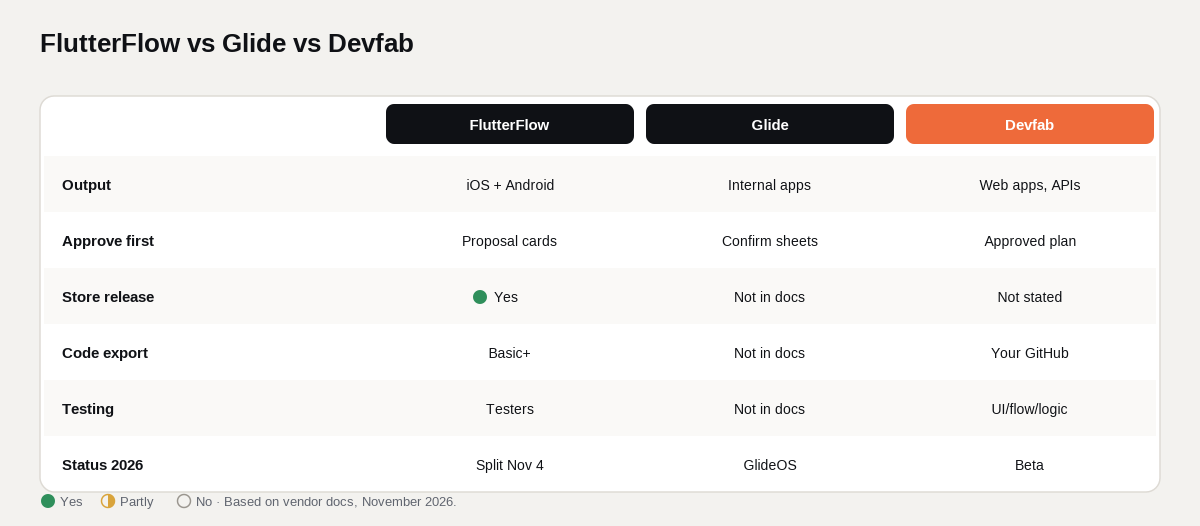
| Aspect | FlutterFlow | Glide (GlideOS) | Source |
|---|---|---|---|
| Output | Native iOS and Android (new FlutterFlow); mobile, web and desktop (Studio) | Internal apps for desktop and phone | FlutterFlow community; Glide |
| Planning | Agent asks via Question, Choice or Proposal cards; a Proposal waits for your approval | SheetSense analyzes your sheets and asks you to confirm before building | FlutterFlow agent; GlideOS recap |
| How the agent works | Builds in "threads" on a copy; changes reach the app only when you push | Builds apps, then operates them, queries data and runs code | FlutterFlow agent; GlideOS recap |
| Testing | Preview, "What changed" review, test sign-in, builds to testers; agent screenshots screens to verify | Not covered in the pages we checked | FlutterFlow docs |
| Release | App Store and Google Play submission and updates | Hosted; apps private to the company by default | FlutterFlow docs; Glide |
| Code export | Download on Basic+; GitHub push on Pro and Max; Flutter export in Studio | Not covered in the pages we checked | FlutterFlow pricing |
| Data | Built-in backend; Firebase and Supabase in Studio | Excel, Sheets, Airtable, Notion, Snowflake and about 150 integrations | FlutterFlow docs; Glide |
| Team and admin | Collaboration and access control on Pro and Max; SSO and audit logs on Enterprise | AI budgets by team and model; SSO on Enterprise | FlutterFlow pricing; Glide pricing |
| Pricing model | Tiers by editors, with one shared AI allowance | Tiers with credits that meter AI tokens | FlutterFlow pricing; Glide pricing |
Cost model by team size
| Team size | FlutterFlow | Glide (GlideOS) | Devfab |
|---|---|---|---|
| 1 person | Free (1 editor); Basic USD 39 per month (USD 29 billed yearly) | Free (can't publish); Basic USD 25 per month | Cost logged per task and per project (Beta) |
| 5 people | Max USD 150 per month, seats 2–5 USD 85 per month each | Pro USD 125 per month (includes team members starting at 5) | Cost logged per task and per project (Beta) |
| 25 people | Enterprise ("Talk to sales") | Pro scaled by seats, or Enterprise (custom) | Cost logged per task and per project (Beta) |
Prices as of November 2026 from FlutterFlow pricing and Glide pricing. FlutterFlow's AI usage is one shared allowance across FlutterFlow and Studio; Glide meters credits, with extra credits on paid plans only. Devfab is in Beta and offers predictable cost: cost is logged after each run, per task and per project.
Where FlutterFlow wins
- The app goes in the stores. Submission and updates to the App Store and Google Play run from the platform.
- You want the code. Flutter code download, GitHub push on Pro and Max, and clean export from Studio.
- You want to approve before the agent builds. Proposal cards wait for your approval, and changes land only when you push.
- Your team knows Flutter. Studio adds custom code, branching, environments and local device runs.
- Testers are part of the flow. Send builds to testers and test sign-in inside the platform.
Where Glide wins
- The data is in spreadsheets today. SheetSense reads formulas, macros and pivot tables before building.
- Ops staff build the app themselves, with no store accounts, testers or release cycle to manage.
- You connect many business systems. Salesforce, NetSuite, HubSpot, Shopify, Jira and more.
- You want to govern AI spend. Budgets by team and model, approved models only.
Watch the meters on both. FlutterFlow's docs say long agent threads use more allowance, and running out pauses messages and pushes (FlutterFlow agent). A Glide community thread from June 2026 says credit costs are hard to predict (Glide community).
Switching from one to the other
From Glide to FlutterFlow. Keep the spreadsheet or move the data to a backend FlutterFlow supports, such as Firebase or Supabase in Studio. Describe the app to the new FlutterFlow agent, approve its Proposal, then push and send a build to testers.
From FlutterFlow to Glide. Export the app's data to a sheet or a source Glide connects to, then let GlideOS build from it. Mobile store releases stop; staff open the Glide app on desktop or phone instead.
Where Devfab fits
FlutterFlow and Glide each cover one shape of app well. A field-service product often needs both: a technician app plus an office web app and an API that billing calls. That is where a single plan across the whole system helps.
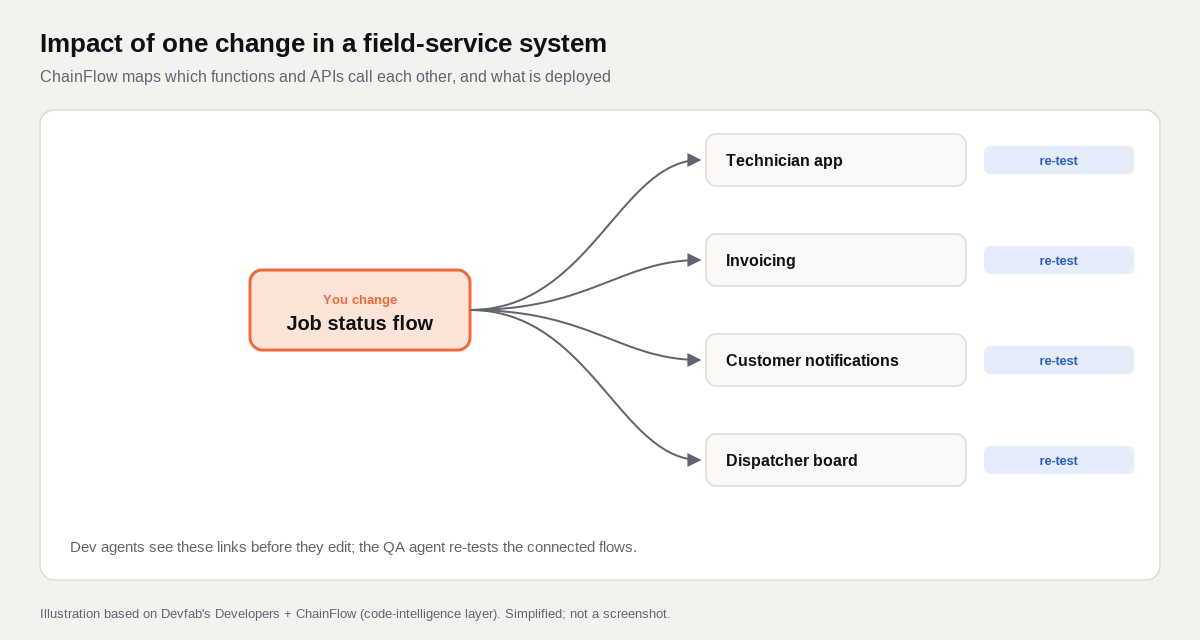
App builders automate the first version. Devfab automates the development lifecycle. The Researcher maps field-service terms and practices before the Planner writes a plan for the whole system, and a person approves it. ChainFlow maps which functions and APIs call each other, so changing the job-status flow shows its impact on invoicing and customer notifications. The QA agent runs UI, flow and logic tests. Devfab is in Beta and not a visual editor, and native mobile store release is not stated. See Devfab vs FlutterFlow and Devfab vs Glide.
FAQ
What is the difference between FlutterFlow and FlutterFlow Studio?
Since November 2026, FlutterFlow is a new AI-agent builder for native iOS and Android apps, and FlutterFlow Studio is the classic visual Flutter builder for mobile, web and desktop, with custom code and Flutter export. One subscription covers both, but a Studio project can't be moved into the new FlutterFlow.
Can Glide publish to the App Store?
Glide apps run on desktop and phone, but native App Store or Google Play publishing is not described in the Glide pages we checked. FlutterFlow submits to the App Store and Google Play and releases updates from the platform.
Which is better for non-technical staff?
Glide, for internal tools. GlideOS builds from the spreadsheets a team already uses and is aimed at operations staff. FlutterFlow's new agent also builds by chat, but its output is a store-ready mobile app with sign-in, testers and releases to manage.
Can I export code from FlutterFlow or Glide?
FlutterFlow, yes: code download on Basic and above, push to GitHub on Pro and Max, and clean Flutter export from Studio. For Glide, a code export to your own repository is not covered in the pages we checked.
Read next
One plan for the whole system, not one app at a time. Try Beta
Sources (checked November 2026): FlutterFlow homepage; FlutterFlow pricing; FlutterFlow docs (new FlutterFlow); FlutterFlow: What the agent can do; FlutterFlow Studio docs; FlutterFlow community: Two ways to build. One FlutterFlow.; HackerNoon: FlutterFlow launches AI-native app builder (Nov 5, 2026); Glide homepage; Glide pricing; GlideOS launch recap (Aug 4, 2026); Glide community: Introducing a new Glide (Mar 5, 2026); Glide community: Pricing issues with GlideOS.
Frequently asked questions
What is the difference between FlutterFlow and FlutterFlow Studio?
Since November 2026, FlutterFlow is a new AI-agent builder for native iOS and Android apps, and FlutterFlow Studio is the classic visual Flutter builder for mobile, web and desktop, with custom code and Flutter export. One subscription covers both, but a Studio project can't be moved into the new FlutterFlow.
Can Glide publish to the App Store?
Glide apps run on desktop and phone, but native App Store or Google Play publishing is not described in the Glide pages we checked. FlutterFlow submits to the App Store and Google Play and releases updates from the platform.
Which is better for non-technical staff?
Glide, for internal tools. GlideOS builds from the spreadsheets a team already uses and is aimed at operations staff. FlutterFlow's new agent also builds by chat, but its output is a store-ready mobile app with sign-in, testers and releases to manage.
Can I export code from FlutterFlow or Glide?
FlutterFlow, yes: code download on Basic and above, push to GitHub on Pro and Max, and clean Flutter export from Studio. For Glide, a code export to your own repository is not covered in the pages we checked.