Short answer: Choose Kiro if you want every feature to start as written requirements, a design and a task list, checked with property-based tests, and your company runs on AWS. Choose Cursor if your developers want to plan and code in one fast editor, review pull requests with Bugbot and pick models from several vendors.
You have heard the debate. Spec people say agents fail because nobody wrote down what "done" means. Editor people say specs slow them down and the plan should live next to the code. Both tools now plan before they write. What differs is the planning artifact each one leaves behind. This page compares those artifacts, then the costs and limits, with sources checked on November 13, 2026.
In this comparison:
- Kiro and Cursor at a glance
- Feature comparison
- Cost model by team size
- Where Kiro wins and where Cursor wins
- Where Devfab fits
Pick the section that answers your question.
Kiro and Cursor at a glance
Who owns them now. Kiro is "Built and run by AWS". Cursor's parent, Anysphere, was acquired by SpaceX; Cursor's August 14, 2026 post says the deal has closed, and Cursor plans now bundle Grok products. Kiro shipped several changes in November 2026: Kiro Crew LTS, an Enterprise Management preview (November 10) and an "Approve for me" permission mode.
Kiro is AWS's agentic coding system. It comes as Crew (persistent background agents), Web, Mobile, an IDE and a CLI. Its core idea is the spec. Each spec generates requirements.md (user stories with EARS-format acceptance criteria), design.md (architecture and sequence diagrams) and tasks.md (trackable tasks). The workflow runs requirements, then design, then planning, then execution. Kiro says specs are verified with property-based tests "across hundreds of cases".
Cursor is an AI editor plus coding agent, also offered as a CLI, cloud agents and SDKs. Plan Mode "creates detailed implementation plans before writing any code". The agent asks clarifying questions, researches the codebase and drafts a plan you edit in chat or markdown. Cloud agents run in isolated VMs on separate branches. Bugbot reviews pull requests.
Feature comparison
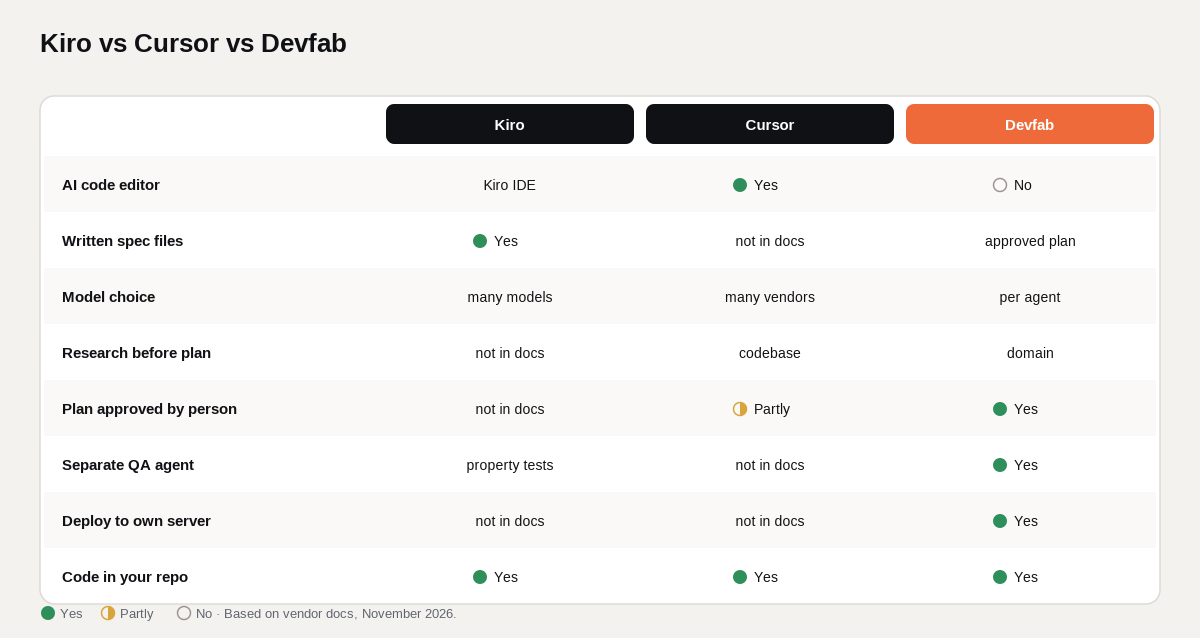
| Aspect | Kiro | Cursor | Source |
|---|---|---|---|
| Where it runs | Crew background agents, Web, Mobile, IDE, CLI | Desktop editor, CLI, cloud agents, mobile, SDKs | Kiro; Cursor docs |
| Planning | Spec: requirements.md, design.md, tasks.md, phase by phase | Plan Mode: clarifying questions, codebase research, editable plan | Kiro specs; Cursor Plan Mode |
| Agent autonomy | Cloud sessions with parallel agents; "Approve for me" permission mode | Parallel cloud agents, one branch each | Kiro; Kiro changelog; Cursor cloud agents |
| Testing and review | Property-based tests tied to specs; hooks on file save or tool use | Bugbot reviews PRs; Autofix pushes fixes | Kiro; Kiro hooks; Bugbot |
| Deploy and hosting | Not covered in the docs we checked | Not a hosting product; Self-Hosted Machines for agent tools | Cursor cloud agents |
| Code and standards | MCP, AGENTS.md, Skills, Open VSX extensions | Rules, skills, hooks, plugins, MCP; GitHub, GitLab, Bitbucket, Azure DevOps | Kiro; Cursor docs |
| Team and admin | SSO, credit pooling, groups, usage limits; Enterprise via AWS IAM Identity Center | SSO on Teams; SCIM, audit logs, model restrictions on Enterprise | Kiro pricing; Cursor Enterprise |
| Model choice | Claude, GPT, DeepSeek, Qwen, or Auto routing | Claude, Gemini, GPT, Grok, Composer; Plus tier Grok only | Kiro; Cursor pricing |
| Pricing model | Free tier with monthly credits; paid tiers; Teams per seat with pooled credits | Free tier; tiers with a weekly usage pool; Teams per seat | Kiro pricing; Cursor pricing |
Cost model by team size
| Team size | Kiro | Cursor | Devfab |
|---|---|---|---|
| 1 person | Perpetual free tier with 50 credits a month and limited models, or a paid tier with more credits | Free tier, or an individual tier with a usage pool; cloud agents need Premium or higher | Cost logged per task and per project (Beta) |
| 5 people | Teams, per seat, with pooled credits, SSO and usage dashboards | Teams, per seat, with SSO and centralized billing | Cost logged per task and per project (Beta) |
| 25 people | Teams or Enterprise with groups and per-group limits; no free tier on Enterprise | Teams or custom Enterprise with group spend limits | Cost logged per task and per project (Beta) |
Pricing models as of November 13, 2026, from Kiro's pricing page and Cursor's pricing page. Kiro notes that a spec task usually costs more credits than a simple prompt, and premium models use credits faster than Auto.
Where Kiro wins
- Written requirements for every feature. EARS-format acceptance criteria and a design doc make scope clear before code exists.
- Tests tied to the spec. Property-based tests check the spec, not just the diff.
- AWS-managed identity and policy. IAM Identity Center and one AWS-console policy across IDE, CLI, Web and Crew (preview).
- Event hooks. Agent hooks run commands or prompts on file save, before or after tool use, and on stop.
Where Cursor wins
- Speed for hands-on developers. Plan, edit and chat stay in one editor with tab completion.
- Flexible plans. Plan Mode suits one task at a time without a fixed document set.
- Pull request review. Bugbot flags bugs and security issues, and Autofix can push the fix.
- More Git hosts. Cloud agents support GitHub, GitLab, Bitbucket and Azure DevOps.
Switching from one to the other
Both tools work in your own git repository, so the code does not move.
- Share one AGENTS.md. Kiro supports the AGENTS.md standard in the workspace root and subdirectories. Cursor supports AGENTS.md in the root and subdirectories too.
- Move tool-specific rules. Kiro steering files live in
.kiro/steering/(product.md, tech.md, structure.md). Cursor project rules live in.cursor/rulesand must use.mdc. - Keep your specs. Kiro's requirements, design and task files are markdown. Commit them, and they stay readable as plain docs after you switch.
- Pilot on one feature in both tools before moving the team.
Where Devfab fits
Kiro and Cursor both plan inside a developer's tool. Devfab plans for the whole team, including people who never open an editor.
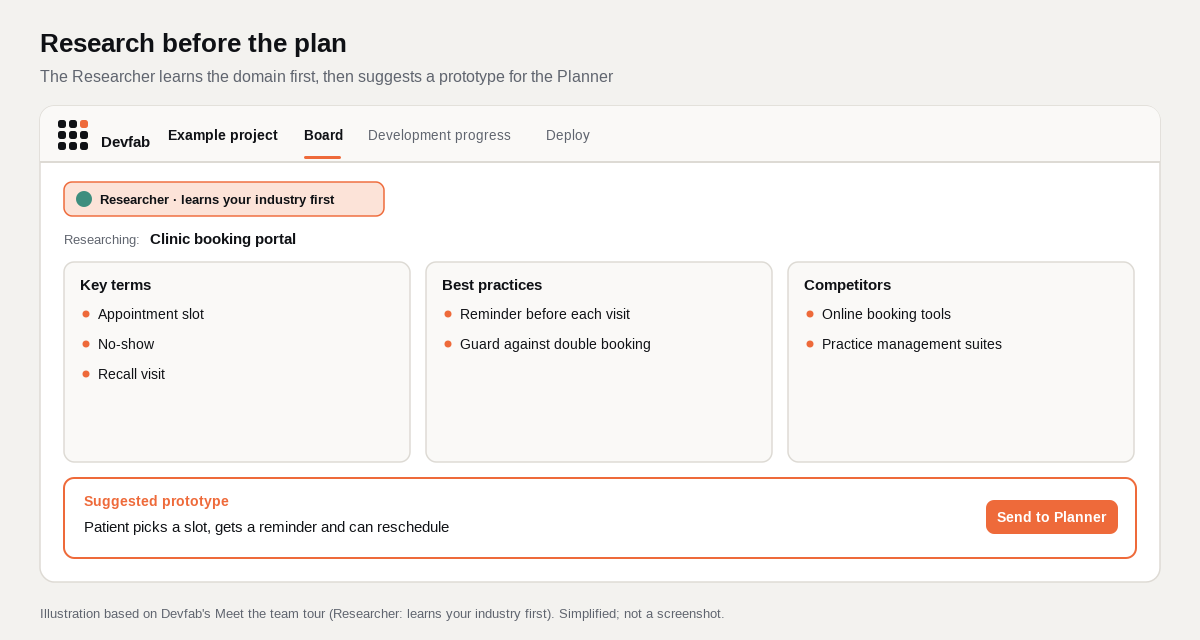
Coding agents automate the developer. Devfab automates the development lifecycle. Before the Planner writes anything, Devfab's research step maps the domain: key terms, best practices for that kind of app and competitors. Then it suggests a prototype. A person approves the plan, the Coordinator creates tickets, and the QA agent runs UI, flow and logic tests. The app deploys to your own server, with user manuals and blueprints.
Honest limits: Devfab is new and in Beta, with a smaller community and fewer integrations than either tool. It is not an editor, and it needs a GitHub account. See Devfab vs Kiro and Devfab vs Cursor.
FAQ
What does a Kiro spec contain?
Each Kiro spec has three files: requirements.md with user stories and EARS-format acceptance criteria, design.md with architecture and sequence diagrams, and tasks.md with trackable implementation tasks. Kiro completes each phase before the next and verifies specs with property-based tests.
Doesn't Cursor have planning too?
Yes. Cursor's Plan Mode asks clarifying questions, researches the codebase and drafts a plan you can edit in chat or as markdown before it builds. The difference is the shape: Kiro produces a fixed set of requirement, design and task files; Cursor produces one plan per task that you edit.
Can I use Kiro with Claude or GPT models?
Yes. Kiro lists Claude, GPT and open-weight models such as DeepSeek and Qwen, plus an Auto mode that routes each task. Cursor lists Claude, Gemini, GPT, Grok and its own Composer, but its entry Plus tier is limited to Grok models.
Is Kiro only for AWS users?
No. Kiro has a free tier and individual plans for anyone. AWS ties show up at the enterprise level: Kiro Enterprise needs AWS IAM Identity Center or an external identity provider, and the Enterprise Management preview sets policy from the AWS console.
Read next
- What is an AI software factory?
- Spec-driven development vs vibe coding: which ships better software?
- Kiro alternatives for teams that ship to production (2026)
- Devfab vs Kiro: which fits a team that ships client work?
- Devfab vs Cursor: which fits a team that ships client work?
Want research and an approved plan before any code? Try Devfab Beta
Sources (checked November 13, 2026): Kiro; Kiro Pricing; Kiro Docs: Specs; Kiro Docs: Hooks; Kiro Docs: Steering; Kiro Changelog; Cursor Docs; Cursor Plan Mode; Cursor Cloud Agents; Cursor Bugbot; Cursor Enterprise; Cursor Rules; Cursor Pricing; Cursor: Joining SpaceX.
Frequently asked questions
What does a Kiro spec contain?
Each Kiro spec has three files: requirements.md with user stories and EARS-format acceptance criteria, design.md with architecture and sequence diagrams, and tasks.md with trackable implementation tasks. Kiro completes each phase before the next and verifies specs with property-based tests.
Doesn't Cursor have planning too?
Yes. Cursor's Plan Mode asks clarifying questions, researches the codebase and drafts a plan you can edit in chat or as markdown before it builds. The difference is the shape: Kiro produces a fixed set of requirement, design and task files; Cursor produces one plan per task that you edit.
Can I use Kiro with Claude or GPT models?
Yes. Kiro lists Claude, GPT and open-weight models such as DeepSeek and Qwen, plus an Auto mode that routes each task. Cursor lists Claude, Gemini, GPT, Grok and its own Composer, but its entry Plus tier is limited to Grok models.
Is Kiro only for AWS users?
No. Kiro has a free tier and individual plans for anyone. AWS ties show up at the enterprise level: Kiro Enterprise needs AWS IAM Identity Center or an external identity provider, and the Enterprise Management preview sets policy from the AWS console.