Short answer: For a lighter plan-then-build loop inside an editor, choose Cursor. For a scriptable agent you can run on Amazon Bedrock, choose Claude Code. For specs without changing tools, pair GitHub Copilot with Spec Kit. For a plan that covers a whole project through testing and deployment, try Devfab.
You liked the idea of Kiro. Requirements, design, then tasks. Then a one-line fix came with three documents attached, and the credit meter moved faster than you planned. Kiro is active and growing, and AWS is moving Amazon Q Developer users onto it. That makes it worth a fair look at the options before you commit a whole team.
In this guide, you'll learn:
- Why teams leave Kiro, in sourced terms
- The quick comparison of six alternatives
- Where Kiro is still the better choice
- How to choose by how much planning you want
Here's how each one compares.
Why teams leave Kiro
First, what Kiro does well. Kiro is AWS's agentic coding system. It runs as an IDE, a CLI, Kiro Web, a mobile app and Kiro Crew, persistent background agents (Kiro). Each spec produces requirements.md (user stories with EARS acceptance criteria), design.md (architecture and sequence diagrams) and tasks.md, and each phase finishes before the next (Kiro docs). Specs are checked with property-based tests. Agent hooks run commands or prompts on events such as file save (Kiro hooks). It supports MCP, AGENTS.md and Skills, and lets you pick Claude, GPT or open-weight models, or Auto routing.
The recurring reasons people look elsewhere:
- Ceremony on small work. A 2026 review says that for a "one-line bug fix, the ceremony is wrong," and calls Kiro "not the fastest way to get code out of an LLM" (DEV review).
- Credits that are hard to budget. Credits are used per prompt and vary by model and task size. A spec task typically costs more than a simple prompt, and premium models use credits faster than Auto (Kiro pricing). The same review found spec sessions "token-hungry" and called pricing "a moving target."
- Extension gaps. Kiro uses Open VSX extensions, and the review notes "some proprietary extensions are missing."
- AWS-shaped admin. Kiro Enterprise requires AWS IAM Identity Center or an external IdP. The new Enterprise Management preview (November 10, 2026) is limited to new profiles in US East (N. Virginia) (Kiro changelog).
- Arriving by migration, not choice. Amazon Q Developer reaches end of support on April 30, 2027, and AWS points its users to Kiro (AWS). Many teams want to compare before they move.
Pricing, as of November 2026 on Kiro's official page: a free tier with 50 credits a month, Pro at USD 20 per user per month with 1,000 credits, higher tiers up to Power, Teams at USD 20 per seat with 500 pooled credits per seat, and add-on credits at USD 0.04 each.
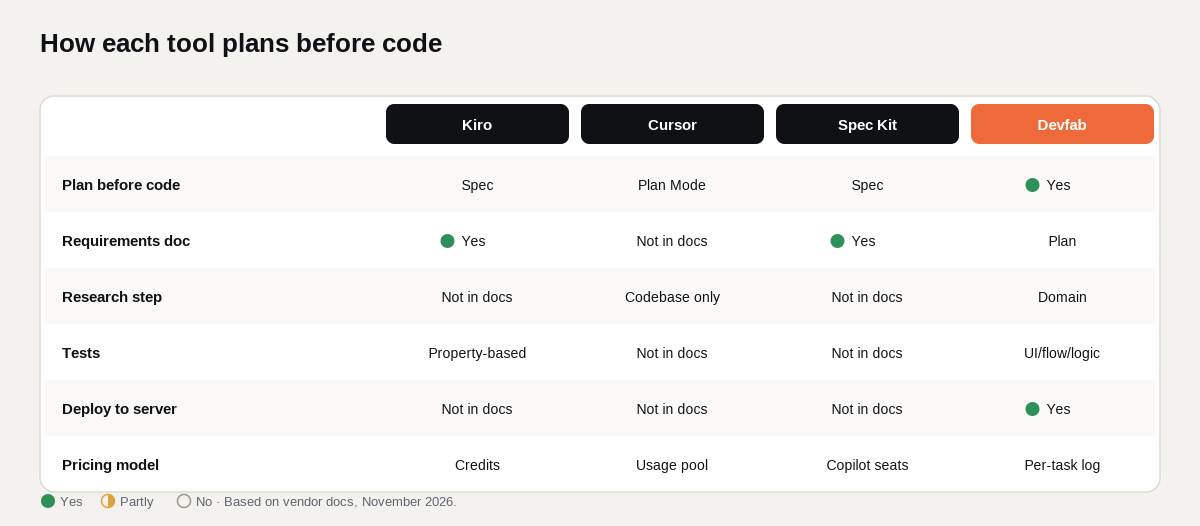
Quick comparison
| Tool | Planning before code | Where it runs | Model choice | Pricing model |
|---|---|---|---|---|
| Kiro (baseline) | Specs: requirements, design, tasks | IDE, CLI, Web, mobile, Crew | Claude, GPT, open-weight, Auto | Credits per prompt; seats for Teams |
| Cursor | Plan Mode, editable plan | Editor, CLI, cloud agents | Many vendors | Usage pool per tier; Teams per seat |
| Claude Code | Plan mode | Terminal, IDEs, desktop, web | Claude only; Bedrock possible | Paid Claude plans or API |
| GitHub Copilot with Spec Kit | Specify, Plan, Tasks, Implement | GitHub, IDEs, CLI | Many vendors by plan | Seats plus AI Credits |
| Devfab | Research, then a plan a person approves | Web workspace + your GitHub | Per agent, or Devfab's default | Cost logged per task and per project (Beta) |
| Cline | Plan and Act modes | VS Code, JetBrains, CLI, desktop | Any, with your own keys | Free extension; pay for inference |
| OpenAI Codex | Approvals and permissions | ChatGPT apps, CLI, IDE, cloud | OpenAI models | Included in ChatGPT plans |
The alternatives
1. Cursor
Verdict: the best pick if Kiro's specs felt heavy and you want a lighter plan inside the editor. Best for: developers who code by hand every day and plan one task at a time. Trade-off: owned by SpaceX since August 2026, with Grok products now bundled into plans (Cursor blog). Pricing: free tier, individual tiers with a usage pool, Teams per seat; see Cursor's pricing page.
- Plan Mode asks clarifying questions, researches the codebase and drafts a plan you can edit in chat or markdown before building (Cursor docs).
- Cloud agents run in isolated VMs, each on its own branch (Cursor docs).
- Bugbot reviews pull requests for bugs and security issues.
2. Claude Code
Verdict: the best pick for AWS teams that want a scriptable agent without Kiro's credits. Best for: terminal-first developers and platform teams that build their own workflows. Trade-off: Claude models only. Pricing: included in paid Claude plans, or pay per token through the API or a cloud provider (Claude pricing).
- Plan mode explores the code and proposes an approach for approval before editing (Claude Code docs).
- Inference can run through Amazon Bedrock or Claude Platform on AWS, so usage stays in your AWS account (Claude Code enterprise).
- Hooks, skills, subagents and MCP cover much of what Kiro's hooks do (Claude Code overview).
3. GitHub Copilot with Spec Kit
Verdict: the best pick if you want spec-driven work without a new IDE. Best for: teams on GitHub that want specs to stay plain files in the repo. Trade-off: you assemble the process yourself; Spec Kit is a toolkit, not a product. Pricing: Copilot Business is USD 19 per seat per month with pooled AI Credits, as of November 2026 (GitHub plans). Spec Kit is open source.
- Spec Kit has four phases (Specify, Plan, Tasks, Implement) and treats the spec as "a contract for how your code should behave" (GitHub Blog).
- It works with GitHub Copilot, Claude Code and Gemini CLI.
- Copilot's cloud agent can create an implementation plan, then open a pull request (GitHub features).
4. Devfab
Verdict: the pick if you like Kiro's plan-first idea but want it to cover research, testing and deployment for a whole project. Best for: agencies and product teams delivering complete apps, new or existing. Trade-off: new and in Beta; not an IDE for hands-on coding. Pricing: predictable cost: cost is logged after each run, per task and per project.
Kiro writes a spec per feature. Devfab starts earlier and ends later. See Where Devfab fits and the full Devfab vs Kiro comparison.
5. Cline
Verdict: the pick if credits were the main pain and you want to pay only for inference. Best for: developers who want open source and full model freedom. Trade-off: every action needs your approval, which is safe but hands-on. Pricing: free extension; usage billing, ClinePass or your own keys (Cline pricing).
- Plan mode reads and discusses without editing; Act mode carries out the plan, and each mode can use a different model (Cline docs).
/deep-planningruns a longer planning session, and Checkpoints allow rollback.- It runs in VS Code, JetBrains, a CLI and a desktop app (Cline docs).
6. OpenAI Codex
Verdict: the pick for teams already on ChatGPT that want parallel cloud tasks. Best for: delegating well-defined fixes, refactors and tests. Trade-off: no spec workflow in the sources we checked; OpenAI models only. Pricing: included in ChatGPT plans, with usage limits and credits beyond them (Codex pricing).
- Runs as a CLI, IDE extension, cloud tasks and in the ChatGPT apps, and reads AGENTS.md (Codex docs).
- Automatic pull request review is built in (OpenAI Codex).
Where Devfab fits
Kiro, Cursor and Claude Code help a developer plan and write code. Coding agents automate the developer. Devfab automates the development lifecycle.
- Research before the plan. Kiro's spec starts from your prompt. Devfab's research step first maps the domain: key terms, best practices for that kind of app, and competitors. Then it suggests a prototype.
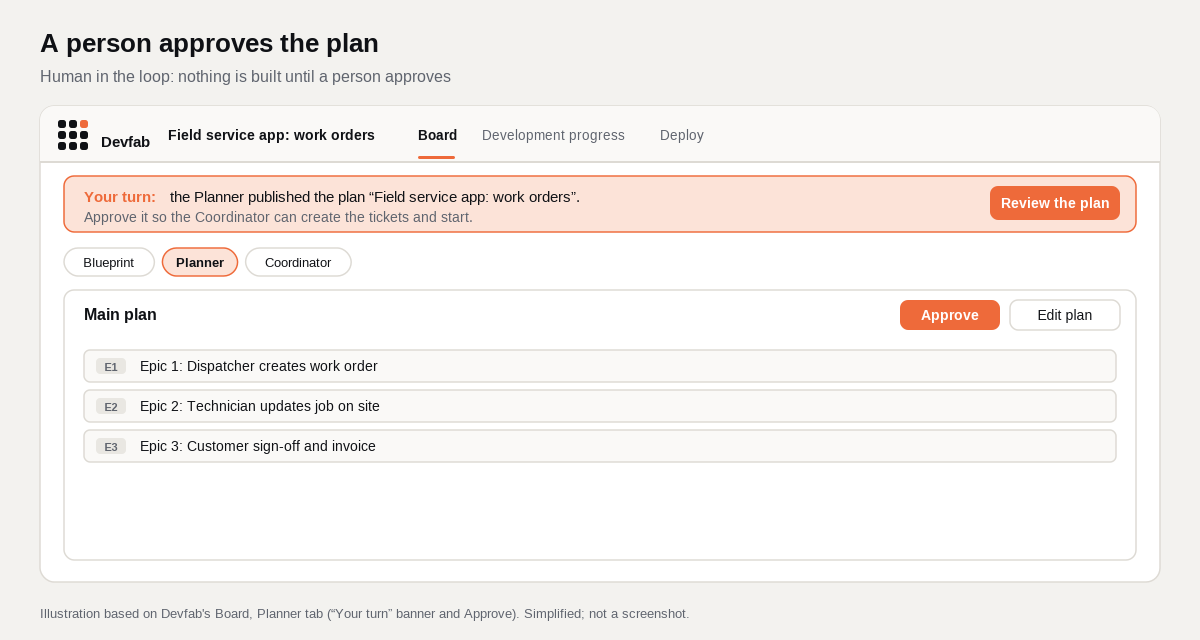
- A plan a person approves. The Planner publishes the plan; the workspace shows "Your turn: the Planner published the plan. Approve it so the Coordinator can create the tickets." The Coordinator then splits it into tickets and assigns developer agents.
- ChainFlow. Devfab's code-intelligence layer maps which functions and APIs call each other and what is deployed, so developer agents see the impact of a change. Changing checkout can affect payments, inventory, order confirmation and notifications.
- QA agent. Kiro checks specs with property-based tests. Devfab's QA agent runs UI and flow tests (screens, buttons and user journeys clicked end to end) plus logic tests, and "QA agent · review before Done" holds work until it passes review.
Then the Deploy agent ships to your own server. Code lives in your own GitHub account (or your organization's). You can choose the model for each agent or keep Devfab's default. Instead of credits per prompt, Devfab offers predictable cost: cost is logged after each run, per task and per project.
Devfab's honest limits:
- It's new and in Beta, with a far smaller community than Kiro or Cursor.
- It has fewer integrations and no AWS-console policy controls.
- It isn't an editor. If you want specs next to your code while you type, Kiro or Spec Kit fit better.
- It needs a GitHub account.
Where Kiro is still the better choice
- Spec-driven work inside your IDE. Requirements with EARS acceptance criteria, design docs and task lists in one tool, with property-based tests tied to them.
- AWS-run organizations. Identity through IAM Identity Center and one policy across IDE, CLI, Kiro Web and Crew from the AWS console.
- Moving from Amazon Q Developer. Kiro is AWS's official path, and Kiro CLI is backward compatible with the
qcommand (Kiro migration guide). - Model choice plus background agents. Claude, GPT and open-weight models, Auto routing, and Crew agents that keep working in the background.
How to choose
- Specs felt heavy for daily work? Cursor's Plan Mode or Claude Code's plan mode.
- Credits were the problem? Cline with your own keys, or Claude Code on your existing Claude or Bedrock account.
- You want specs as plain files, any agent? Spec Kit with GitHub Copilot or Claude Code.
- You need the whole lifecycle, with research, an approved plan, UI and flow tests and deploy to your own server? Devfab.
- Already on ChatGPT? OpenAI Codex.
One caution applies to every spec tool. Martin Fowler's site found that agents often did not follow the spec, which can give "a false sense of control" (martinfowler.com). Whatever you pick, test the result, not just the plan. Our spec-driven development vs vibe coding guide covers when specs pay off.
FAQ
What is the best alternative to Kiro for spec-driven development?
If you want specs inside the tools you already use, GitHub's open-source Spec Kit runs a Specify, Plan, Tasks, Implement flow with GitHub Copilot, Claude Code or Gemini CLI. If you want the plan to cover a whole project through testing and deploy, Devfab adds research before the plan and a QA agent after it.
How does Kiro charge?
Kiro uses credits. As of November 2026 the official pricing page lists a free tier with 50 credits a month, Pro at USD 20 per user per month with 1,000 credits, and Teams at USD 20 per seat with 500 pooled credits. Spec tasks typically use more credits than simple prompts.
Is Kiro replacing Amazon Q Developer?
Yes. AWS points Amazon Q Developer users to Kiro. Q Developer IDE plugins and paid subscriptions reach end of support on April 30, 2027, and Kiro CLI is the next version of the Q CLI.
Do I need an AWS account to use Kiro?
A 2026 review says sign-in does not require an AWS account and the IDE does not assume you deploy to AWS. Kiro Enterprise does require AWS IAM Identity Center or an external identity provider.
Read next
- What is an AI software factory?
- Devfab vs Kiro
- Kiro vs Cursor
- Amazon Q Developer alternatives
- Spec-driven development vs vibe coding
Like planning first? See a plan that runs through QA and deploy. Try the Devfab Beta
Sources (checked November 13, 2026): Kiro home; Kiro pricing; Kiro docs: Spec concepts; Kiro docs: Hooks; Kiro changelog; Kiro: Upgrading from Q CLI; DEV: Amazon Kiro review (2026); AWS: Amazon Q Developer end of support; Cursor docs: Plan Mode; Cursor docs: Cloud Agents; Cursor pricing; Cursor blog: Joining SpaceX; Claude Code overview; Claude Code: Enterprise deployment; Claude Code: Manage costs; Claude pricing; GitHub Blog: Spec-driven development with Spec Kit; GitHub Docs: Copilot plans; GitHub Docs: Copilot features; Cline docs: Plan and Act; Cline docs overview; Cline pricing; OpenAI Codex; ChatGPT + Codex docs; Codex pricing; martinfowler.com: Understanding spec-driven development.
Frequently asked questions
What is the best alternative to Kiro for spec-driven development?
If you want specs inside the tools you already use, GitHub's open-source Spec Kit runs a Specify, Plan, Tasks, Implement flow with GitHub Copilot, Claude Code or Gemini CLI. If you want the plan to cover a whole project through testing and deploy, Devfab adds research before the plan and a QA agent after it.
How does Kiro charge?
Kiro uses credits. As of November 2026 the official pricing page lists a free tier with 50 credits a month, Pro at USD 20 per user per month with 1,000 credits, and Teams at USD 20 per seat with 500 pooled credits. Spec tasks typically use more credits than simple prompts.
Is Kiro replacing Amazon Q Developer?
Yes. AWS points Amazon Q Developer users to Kiro. Q Developer IDE plugins and paid subscriptions reach end of support on April 30, 2027, and Kiro CLI is the next version of the Q CLI.
Do I need an AWS account to use Kiro?
A 2026 review says sign-in does not require an AWS account and the IDE does not assume you deploy to AWS. Kiro Enterprise does require AWS IAM Identity Center or an external identity provider.