Short answer: Kiro wins when you want written requirements, a design and a task list before any code, with property-based tests and AWS-managed identity and billing. GitHub Copilot wins when your code, issues and reviews already live on GitHub and you want completions, review and a cloud agent that opens pull requests there.
Your developers already use Copilot. Someone on the team just tried Kiro and wants specs before code. One camp says Copilot is enough because it lives where the work lives. The other says Kiro's spec files stop the agent from guessing. Both tools now bill in credits, which makes the price question harder than it looks. This page acts as referee, with every fact sourced.
In this comparison:
- Kiro and GitHub Copilot at a glance
- Feature comparison
- Cost model by team size
- Where Kiro wins and where GitHub Copilot wins
- Where Devfab fits
The rest of this page covers it in order.
Kiro and GitHub Copilot at a glance
Status changes in 2026. On November 10, 2026, Kiro added Enterprise Management (preview), which applies one AWS-console policy across the IDE, CLI, Kiro Web and Kiro Crew LTS (Kiro changelog). The same month brought an "Approve for me" permission mode. GitHub moved Copilot plans to AI credits, added a Max tier above Pro+, and lists request-based billing as legacy (GitHub Docs: plans). A new "Copilot in the cloud" experience reached paid plans on October 28, 2026 (GitHub Docs: cloud agent).
Kiro is AWS's agentic coding system. It comes as an IDE, a CLI, a web app, a mobile app and Crew, a set of persistent background agents (Kiro). Its core idea is the spec. Each spec generates requirements.md (user stories with EARS-format acceptance criteria), design.md (architecture and sequence diagrams) and tasks.md, and each phase is finished before the next (Kiro docs: specs). Kiro is built for developers and teams, "from quick fixes to larger projects".
GitHub Copilot is an AI assistant built into GitHub.com, IDEs, the terminal and a desktop app (GitHub Docs: features). Its cloud agent takes assigned work, runs in a GitHub Actions-based environment or a cloud sandbox, and opens a pull request (GitHub Docs: cloud agent). It serves individuals on Free to Max plans and organizations on Business and Enterprise.
Feature comparison
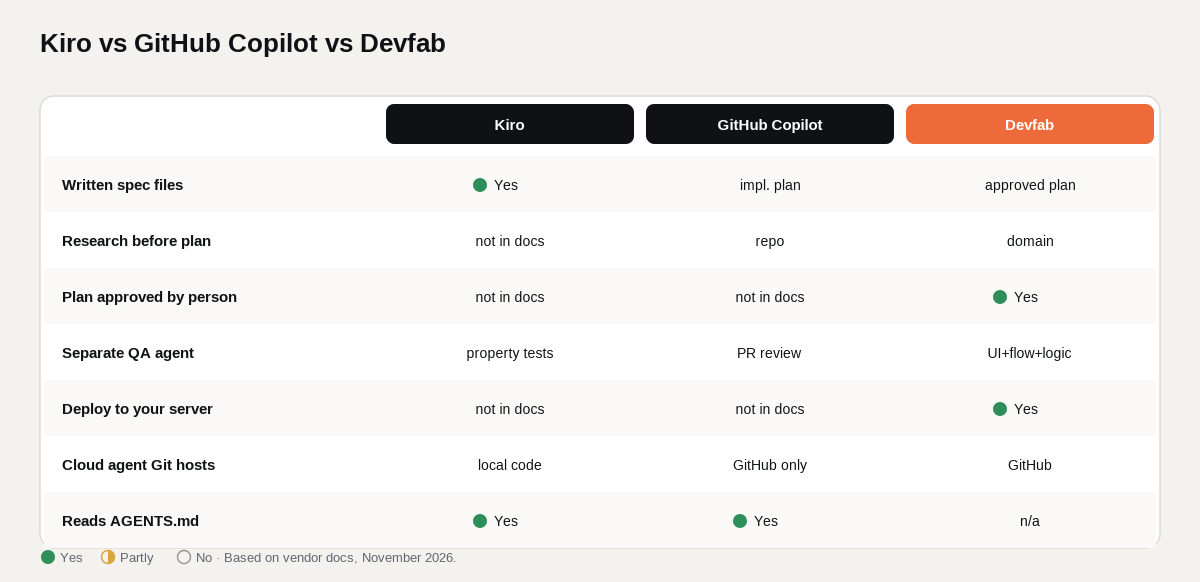
| Aspect | Kiro | GitHub Copilot | Source |
|---|---|---|---|
| Where it runs | IDE, CLI, Web, Mobile, Crew background agents | GitHub.com, Mobile, many IDEs, Copilot CLI, desktop app | Kiro; Copilot features |
| Planning and spec | requirements.md, design.md, tasks.md; phases in order | Cloud agent researches the repo and creates an implementation plan | Kiro specs; Copilot features |
| Agent autonomy | Cloud sessions with parallel agents; hooks on file save, tool use and stop | Cloud agent: one repo, one branch and one PR per task in Actions-based sessions | Kiro hooks; Copilot cloud agent |
| Testing and review | Specs verified with property-based tests | Pull request code review on paid plans | Kiro; Copilot plans |
| Deploy and hosting | Not covered in the docs we checked | Not covered in the docs we checked | — |
| Git hosts | Works on local code | Cloud agent only on GitHub-hosted repos | Copilot cloud agent |
| Team and admin | SSO, credit pooling, groups, per-user limits; Enterprise via IAM Identity Center | Policies, usage data, file exclusions; agent control plane and audit fields GA Feb 26, 2026 | Kiro pricing; GitHub changelog |
| Model choice | Claude, GPT, open-weight models, or Auto routing | OpenAI, Anthropic, Google, Microsoft, Moonshot AI and xAI models; Claude and Codex agents on Pro+ and Max | Kiro; Copilot models |
| Pricing model | Free tier; monthly credits per tier; Teams per seat with pooled credits | AI credits on every plan; Business and Enterprise per seat with pooled credits | Kiro pricing; Copilot plans |
Cost model by team size
| Team size | Kiro | GitHub Copilot | Devfab |
|---|---|---|---|
| 1 person | Free: 50 credits a month, limited models; Pro USD 20 for 1,000 credits; Pro+ USD 40 | Free: 2,000 completions a month, no cloud agent or PR review; Pro USD 10; Pro+ USD 39 | Cost logged per task and per project (Beta) |
| 5 people | Teams USD 20 per seat, 500 credits per seat, pooled | Business USD 19 per seat, 1,900 AI credits per user, pooled | Cost logged per task and per project (Beta) |
| 25 people | Teams, or Enterprise through AWS (contact sales, no free tier) | Business, or Enterprise USD 39 per seat with 3,900 credits per user | Cost logged per task and per project (Beta) |
Prices per month as of November 2026 from Kiro pricing, Copilot plans and GitHub Docs: plans. The two credits are different units: Kiro add-on credits cost USD 0.04 and use varies by model and task size; a Copilot AI credit is USD 0.01 and completions use none. Devfab is in Beta and offers predictable cost: cost is logged after each run, per task and per project.
Where Kiro wins
- You want the spec on paper first. Requirements, design and tasks are separate files with acceptance criteria, so a reviewer can check intent before code.
- Tests should follow the requirements. Kiro verifies specs with property-based tests.
- Identity and billing run through AWS. Enterprise uses IAM Identity Center, and one AWS-console policy now spans the IDE, CLI, Web and Crew.
- You want automation on events. Hooks run commands or agent prompts on file save, before or after tool use, and on stop.
- Your repos are not on GitHub. Kiro works on local code; Copilot's cloud agent needs GitHub.
Where GitHub Copilot wins
- Your work already lives on GitHub. Issues, pull requests, Actions and review stay in one place, and the agent can start from an issue, a PR or the Agents tab.
- You want completions everywhere. Copilot covers many IDEs plus the CLI, and completions do not consume AI credits.
- You want a choice of agents. Claude and Codex agents are listed on Pro+ and Max.
- You need agent governance at scale. The agent control plane adds an AI administrator role and agent activity in audit logs.
- Small, well-scoped tasks. One repo, one branch and one PR per task is a good fit for tickets with clear edges.
Switching from one to the other
From Copilot to Kiro. Kiro supports AGENTS.md, MCP and Skills (Kiro), so move the content of .github/copilot-instructions.md into AGENTS.md and add the same MCP servers. The Kiro IDE uses Open VSX extensions, so check that your editor extensions are listed there. Start with one feature as a spec and review the three files before tasks run.
From Kiro to Copilot. Copilot's cloud agent reads AGENTS.md, CLAUDE.md and GEMINI.md, plus .github/copilot-instructions.md (GitHub Docs: custom instructions). Your spec files are plain markdown in the repo, so keep them and point to them from AGENTS.md. Move the repo to GitHub first if it lives elsewhere.
Where Devfab fits
Kiro writes a spec for a feature. Copilot turns an issue into a pull request. In the docs we checked, neither researches the domain before planning, runs a separate QA step with UI and flow tests, or deploys the finished app.
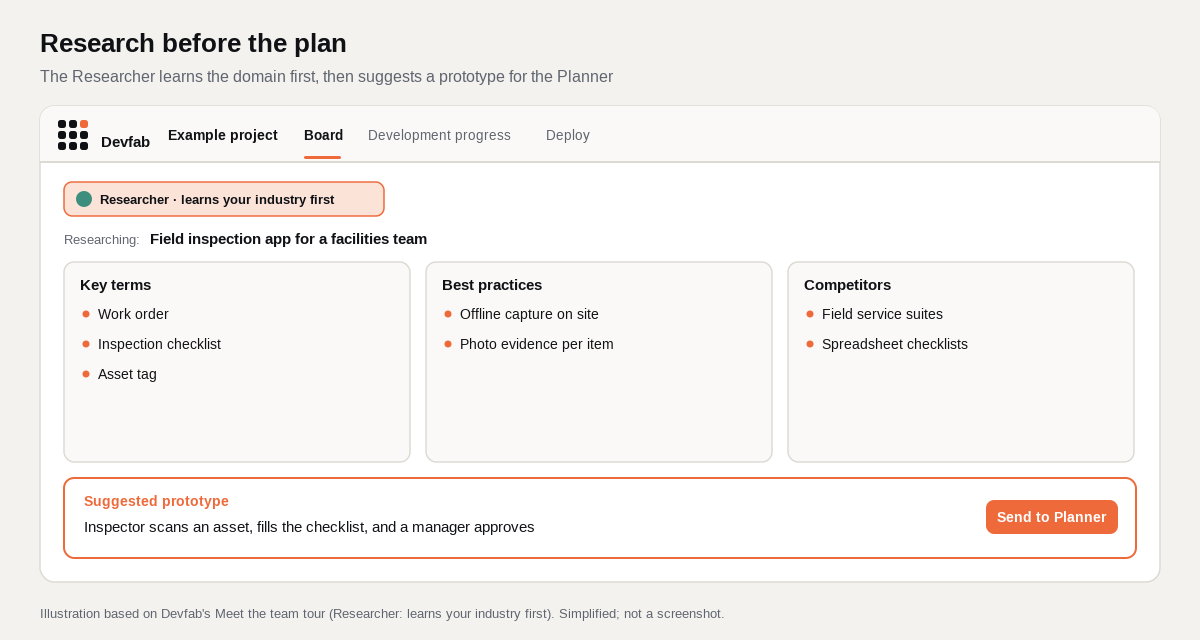
Coding agents automate the developer. Devfab automates the development lifecycle. Its Researcher maps key terms, best practices and competitors before the Planner writes a plan, and a person approves that plan before tickets are created. Dev agents work with ChainFlow, which maps which functions and APIs call each other, and the QA agent runs UI, flow and logic tests before Deploy ships to your own server. Code stays in your own GitHub account.
Honest limits: Devfab is new and in Beta, with a smaller community and fewer integrations than either tool. It is not an editor for hands-on coding, and it needs a GitHub account. See Devfab vs Kiro and Devfab vs GitHub Copilot.
FAQ
Is a Kiro credit the same as a GitHub Copilot AI credit?
No. As of November 2026, Kiro sells extra credits at USD 0.04 each, and a credit's use varies by model and task size. GitHub prices one AI credit at USD 0.01, and completions do not consume credits. Compare what a real week of your team's work costs on each, not the credit counts.
Can GitHub Copilot write specs like Kiro does?
Copilot's cloud agent can research a repository and create an implementation plan before it changes code. Kiro goes further on paper: each spec produces requirements.md with EARS acceptance criteria, design.md and tasks.md, and each phase is completed before the next one starts.
Does Copilot's cloud agent work with GitLab or Bitbucket?
No. GitHub's docs say the Copilot cloud agent only works with repositories hosted on GitHub. Kiro's IDE and CLI work on local code, so the Git host matters less for day-to-day use.
Can I use both tools on the same repository?
Yes. Both read AGENTS.md, so one instruction file can guide both. A practical split is Copilot for completions and pull request review, and Kiro for larger features that benefit from written specs.
Read next
- What is an AI software factory?
- Kiro alternatives
- GitHub Copilot alternatives
- Spec-driven development vs vibe coding
Want the research, the approved plan and the QA report as well as the code? Try Beta
Sources (checked November 13, 2026): Kiro homepage; Kiro pricing; Kiro docs: Spec concepts; Kiro docs: Hooks; Kiro changelog; GitHub Copilot plans; GitHub Docs: Plans for GitHub Copilot; GitHub Docs: Copilot features; GitHub Docs: About Copilot cloud agent; GitHub Docs: Supported AI models; GitHub Docs: Custom instructions support; GitHub Changelog: Enterprise AI Controls and agent control plane GA (Feb 26, 2026).
Frequently asked questions
Is a Kiro credit the same as a GitHub Copilot AI credit?
No. As of November 2026, Kiro sells extra credits at USD 0.04 each, and a credit's use varies by model and task size. GitHub prices one AI credit at USD 0.01, and completions do not consume credits. Compare what a real week of your team's work costs on each, not the credit counts.
Can GitHub Copilot write specs like Kiro does?
Copilot's cloud agent can research a repository and create an implementation plan before it changes code. Kiro goes further on paper: each spec produces requirements.md with EARS acceptance criteria, design.md and tasks.md, and each phase is completed before the next one starts.
Does Copilot's cloud agent work with GitLab or Bitbucket?
No. GitHub's docs say the Copilot cloud agent only works with repositories hosted on GitHub. Kiro's IDE and CLI work on local code, so the Git host matters less for day-to-day use.
Can I use both tools on the same repository?
Yes. Both read AGENTS.md, so one instruction file can guide both. A practical split is Copilot for completions and pull request review, and Kiro for larger features that benefit from written specs.