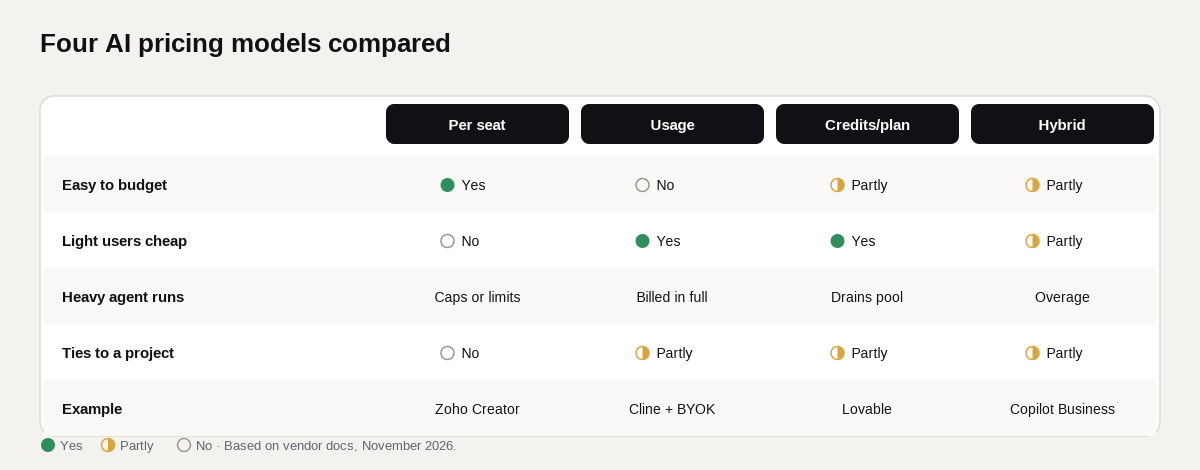
Short answer: Per-seat pricing wins when usage is steady and finance needs a fixed number each month. Usage-based pricing wins when a few people or agents do most of the work and idle seats would waste money. In 2026 most AI dev tools mix both, so compare the overage rate, not just the headline seat price.
You approved AI coding seats for the whole team. Three people use them all day; the rest barely open them. Then a usage add-on appears on the invoice, and nobody can say which project caused it.
That is the AI pricing problem in one paragraph. Seats were easy to budget. Agents that run for a long time on their own are not. This page explains the models with list prices checked in November 2026.
In this guide, you'll learn:
- Definitions
- The models side by side
- When to choose per-seat pricing
- When to choose usage-based pricing
- Where an AI software factory fits
Start with the words vendors use, because they don't all mean the same thing.
Definitions
Per-seat pricing charges a fixed fee per person each month, whatever they use. Stripe's guide calls it the default for IDE coding assistants: easy to buy and budget, but it "doesn't reflect compute costs," and "the lighter users are subsidized by the heavier ones" (Stripe, Apr 2026).
Usage-based pricing charges by consumption: requests, tokens or compute. It matches cost to use. Stripe's verdict: "The trade-off is predictability" (same source).
Credits are a prepaid pool of usage. The vendor converts work into credits at its own rate. GitHub states the rate openly: one AI credit equals USD 0.01 (GitHub Copilot plans).
Hybrid pricing combines a seat fee with a usage meter. In an October 2025 brief, Bain looked at 30+ SaaS vendors adding generative AI. About 65% used a hybrid model, about 35% raised seat prices and bundled AI in, and none had moved fully to usage- or outcome-based pricing. Bain called hybrid "the dominant interim strategy" (Bain).
Other units show up in low-code platforms: Mendix prices by number of apps and users (Mendix pricing), and OutSystems sizes quotes by application objects, meaning screens, tables and API methods (OutSystems pricing).
The models side by side
| Tool | Model | What you pay, as of November 2026 | What drives the bill up |
|---|---|---|---|
| GitHub Copilot Business | Seat plus pooled credits | USD 19 per granted seat per month; extra usage USD 0.01 per credit | Chat and agent work; completions don't use credits |
| Claude (Team, Enterprise) | Seat plus usage | Team Standard USD 25 per user per month (USD 20 annual); Enterprise USD 20 per seat per month billed annually plus usage at API rates | Long sessions and agent teams |
| Devin Teams | Team fee plus seats plus usage | USD 80 per month team fee plus USD 40 per month per dev seat; extra usage at API pricing | Work beyond daily and weekly quotas |
| Cursor Teams | Seat plus usage | USD 30+ per user per month; third-party models at API list price | Third-party model use, within spending caps |
| Cline | Usage only | Free extension; you pay inference, or bring your own key | Tokens sent to your provider |
| Lovable | Credits per plan | Pro USD 25 per month (100 credits); Business USD 50 per month | Building, chat, hosting and in-app AI all use credits |
| Rocket.new | Credits per plan | Pro USD 25 per month (100 credits); unlimited team members on paid plans | Credit use, not headcount |
| Augment Code | Flat per plan | Standard USD 20 per month; Business USD 100 per month; no per-seat charge | Plan limits |
Sources: GitHub Copilot plans; GitHub Docs: Copilot plans; Claude pricing; Devin pricing; Cursor pricing; Cline pricing; Lovable pricing; Rocket.new pricing; Augment Code pricing.
Three things stand out.
Almost nothing is purely per seat any more. Copilot, Claude, Devin and Cursor all charge a seat and then meter heavy work. GitHub now describes its old request-based billing as legacy (GitHub Docs).
"Free" tools move the cost, they don't remove it. Cline's extension is free, but inference is billed separately or through your own key (Cline docs). goose and OpenCode work the same way: the agent costs nothing and the model provider bills you (goose docs; OpenCode).
Vendors publish their own averages. Anthropic states an enterprise average of around USD 150 to 250 per developer per month for Claude Code (Claude Code costs). Treat any average as a starting point. Your own logs are the real number.
When to choose per-seat pricing
- Usage is even across the team. If everyone uses AI completions all day, a seat is the cheapest unit, and nobody is subsidizing anyone.
- Finance needs a fixed line. A seat price is what procurement knows how to buy. Bain notes that sales and procurement teams are still used to buying by headcount.
- Most use is light, inline help. On Copilot, completions and next edit suggestions don't consume credits, so a seat covers most of a typical developer's day.
- You need admin features per person. SSO, audit logs and policy controls usually sit on per-seat business tiers, such as Copilot Business and Enterprise.
- Low-code apps with many internal users. Zoho Creator lists Standard at USD 8 per user per month billed annually (Zoho Creator pricing), which is easy to plan per department.
When to choose usage-based pricing
- A few people do most of the AI work. Paying seats for occasional users wastes money; paying per use doesn't.
- Agents run long jobs. Background agents and migrations burn far more compute than chat. Usage pricing at least shows that cost in the open, instead of hiding it in a seat that runs out.
- You want model freedom. Bring-your-own-key tools like Cline, goose and OpenCode let you pick any provider, including local models, and pay only what you use.
- Many reviewers, few builders. Credit plans like Rocket.new include unlimited team members, so clients and stakeholders can look without adding seats.
- You bill clients by job. Usage can be tied to a project. A seat can't.
The catch is the one Stripe names: predictability. Before you commit, ask each vendor three questions. What happens at the limit: a hard stop, a slowdown, or automatic overage? Can an admin set spending caps per person or project? And can you export usage by project? Retool's October 2026 change is a useful warning. When it made bring-your-own AI key an Enterprise-only feature, users on lower plans complained their managed credits ran out (Retool Forum).
A worked example: one agency, two bills
Take a web agency with a mix of developers, a QA lead and two project managers. They build a B2B quote tool for one client and a school portal for another.
On a per-seat plan, the agency buys a seat for each developer. The bill is flat. But the invoice can't tell them whether the quote tool or the school portal used more AI, so both clients get the same markup.
On a usage plan, the bill moves with the work. A big refactor on the school portal shows up as a spike. If the tool can tag usage by repository or project, the agency can price the next school portal from real numbers. If it can't, they have a bigger, less predictable bill and the same blind spot.
The lesson: the unit you're billed in matters less than the unit you can see. For client work, the useful unit is the job.
Where an AI software factory fits
Coding agents automate the developer. Devfab automates the development lifecycle, so its cost view is built around the work, not the person.
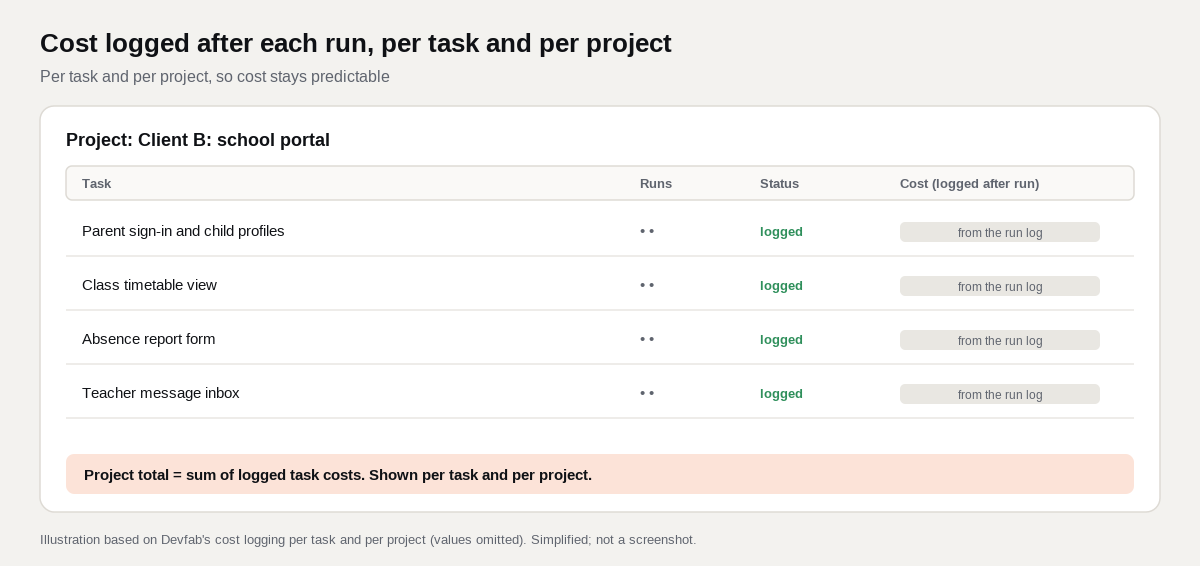
Devfab is in Beta and does not publish a price. It offers predictable cost: cost is logged after each run, per task and per project. A run covers the steps a ticket goes through: the Researcher mapping the domain before the plan, the Planner's plan that a person approves, dev agents using ChainFlow to see which functions and APIs a change touches, and the QA agent running UI, flow and logic tests. The cost log then shows what each task and each project cost.
You can choose the model for each agent or keep Devfab's default. Code lives in your own GitHub account, and you deploy to your own server.
Honest limits: Devfab is new and in Beta, has a smaller community and fewer integrations than mature tools, is not an editor for hands-on coding, and needs a GitHub account. If your team mostly wants inline completions in an editor, a per-seat assistant is the simpler buy.
FAQ
Is per-seat or usage-based pricing cheaper for AI coding tools?
It depends on how unevenly your team uses AI. With per-seat pricing, light users pay the same as heavy ones. With usage pricing, light users cost little but heavy agent runs can make the bill jump. Most 2026 plans mix both, so look at the seat fee and the overage rate together.
What is a hybrid AI pricing model?
A seat fee plus a usage meter. GitHub Copilot Business is USD 19 per granted seat per month with pooled AI credits, and extra use costs USD 0.01 per credit, as of November 2026. A Bain brief found about 65% of SaaS vendors adding generative AI used a hybrid model.
Why do some AI tools price per plan instead of per user?
App builders such as Lovable and Rocket.new price by credits per plan, and Rocket.new paid plans include unlimited team members. That suits teams where many people review but few prompts drive the cost. It also means one heavy builder can drain the shared pool.
How should an agency bill clients for AI-built work?
Track cost per task and per project, not per seat. Seats tell you what you spent on tools, not what a client job cost. A cost log per task lets you price the next similar job from real numbers instead of guesses.
Does Devfab charge per seat or by usage?
Devfab is in Beta and does not publish a price. It offers predictable cost: cost is logged after each run, per task and per project, so you can see what each piece of work cost.
Read next
- What is an AI software factory?
- How to track AI cost per task and per project
- How agencies should price AI-built work
- AI software factory vs AI coding tools
Want to see cost per task instead of per seat? Try Beta
Sources (checked November 2026): Stripe: Pricing models for AI coding companies (Apr 2026); Bain: Per-seat software pricing isn't dead (Oct 2025); GitHub Copilot plans; GitHub Docs: Plans for GitHub Copilot; Claude pricing; Claude Code docs: Manage costs; Devin pricing; Cursor pricing; Cline pricing; Cline docs; goose docs; OpenCode; Lovable pricing; Rocket.new pricing; Augment Code pricing; Mendix pricing; OutSystems pricing; Zoho Creator pricing; Retool Forum, Oct 2026.
Frequently asked questions
Is per-seat or usage-based pricing cheaper for AI coding tools?
It depends on how unevenly your team uses AI. With per-seat pricing, light users pay the same as heavy ones. With usage pricing, light users cost little but heavy agent runs can make the bill jump. Most 2026 plans mix both, so look at the seat fee and the overage rate together.
What is a hybrid AI pricing model?
A seat fee plus a usage meter. GitHub Copilot Business is USD 19 per granted seat per month with pooled AI credits, and extra use costs USD 0.01 per credit, as of November 2026. A Bain brief found about 65% of SaaS vendors adding generative AI used a hybrid model.
Why do some AI tools price per plan instead of per user?
App builders such as Lovable and Rocket.new price by credits per plan, and Rocket.new paid plans include unlimited team members. That suits teams where many people review but few prompts drive the cost. It also means one heavy builder can drain the shared pool.
How should an agency bill clients for AI-built work?
Track cost per task and per project, not per seat. Seats tell you what you spent on tools, not what a client job cost. A cost log per task lets you price the next similar job from real numbers instead of guesses.
Does Devfab charge per seat or by usage?
Devfab is in Beta and does not publish a price. It offers predictable cost: cost is logged after each run, per task and per project, so you can see what each piece of work cost.