Short answer: AWS is retiring Amazon Q Developer's coding plugins on April 30, 2027 and points users to Kiro. Choose Kiro to stay with AWS. Choose GitHub Copilot if you work in Visual Studio or Eclipse, which Kiro doesn't support natively. Choose Claude Code for an agent that can run inference through Amazon Bedrock.
You didn't choose to leave Amazon Q Developer. AWS chose for you. New subscriptions stopped in May, the console chat got a new name in November, and the IDE plugins stop being supported on April 30, 2027. AWS has a default answer, Kiro. It's a good one for many teams. But it changes your editor, your billing and your workflow, so it deserves the same comparison you'd give any new tool.
In this guide, you'll learn:
- Why teams leave Amazon Q Developer, with the full timeline
- The quick comparison, including IDE coverage
- Where Amazon Q Developer is still the better choice until the cutoff
- How to choose by editor and AWS ties
Use the sections below as your migration playbook.
Why teams leave Amazon Q Developer
The timeline, from AWS's own posts:
| Date | What changed |
|---|---|
| November 17, 2025 | Kiro CLI succeeds the Q Developer CLI and accepts the q command (Kiro) |
| April 30, 2026 | AWS announces end of support for Q Developer IDE plugins and paid subscriptions (AWS) |
| May 15, 2026 | New Free Tier accounts and new subscriptions blocked; existing Pro subscriptions can still add users |
| November 5, 2026 | Q Developer in the AWS console renamed AWS assistant, offered free for now (AWS) |
| April 30, 2027 | IDE plugins, paid subscriptions, Java upgrade and .NET porting transformations reach end of support |
What you are replacing. Q Developer has IDE plugins for VS Code, JetBrains, Visual Studio and Eclipse (preview), a CLI agent, and GitHub and GitLab integrations. Its agent mode reads and writes files, runs shell commands and plans multi-file features, then makes changes after approval. You can assign GitHub issues to it. It scans for exposed credentials and other issues, reviews pull requests, writes READMEs and data-flow diagrams, and can query your AWS resources (AWS). Pro is USD 19 per user per month on the official pricing page, as of November 2026, with an admin dashboard, Identity Center support and IP indemnity (AWS pricing).
The practical triggers:
- A hard end date. Critical bug fixes continue, but no new capability ships to Q Developer. AWS says the newest coding models are available only in Kiro.
- No new seats for new customers. New teams can't subscribe at all.
- Editor gaps in the official path. Kiro has no native plugins for Visual Studio or Eclipse. Users there must switch to the Kiro IDE or run Kiro CLI alongside their editor, and JetBrains users connect Kiro CLI through ACP (Kiro migration guide).
- Transformations end too. For Java upgrades and .NET porting, AWS names AWS Transform custom and AWS Transform full-stack Windows modernization as the next step.
Quick comparison
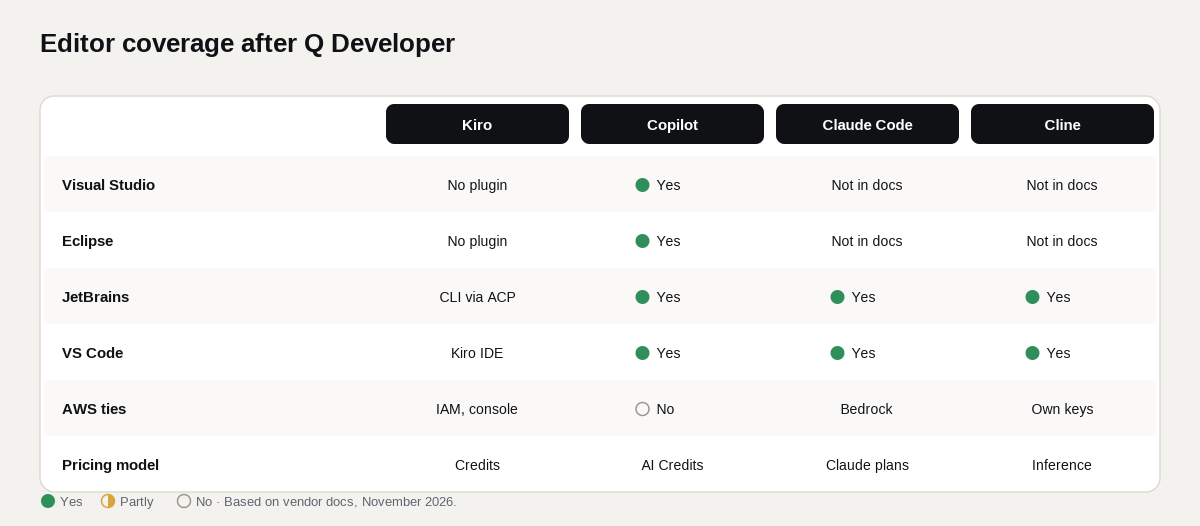
| Tool | Visual Studio | Eclipse | JetBrains | Stays in AWS billing or identity | Pricing model |
|---|---|---|---|---|---|
| Kiro | No native plugin | No native plugin | Via Kiro CLI and ACP | Yes: IAM Identity Center for Enterprise | Credits; Teams per seat |
| GitHub Copilot | Yes, with agent mode | Yes, with agent mode | Yes | No | Seats plus AI Credits |
| Claude Code | Not in docs we checked | Not in docs we checked | Yes | Inference through Amazon Bedrock | Claude plans, API or cloud provider |
| Cursor | No (own editor) | No (own editor) | Integration listed | No | Usage pool; Teams per seat |
| Cline | Not in docs we checked | Not in docs we checked | Yes (Enterprise) | Your own keys | Free; pay for inference |
| Devfab | Not an IDE tool | Not an IDE tool | Not an IDE tool | No; deploys to your own server | Cost logged per task and per project (Beta) |
The alternatives
1. Kiro
Verdict: the official path, and the right one for most AWS-first teams. Best for: teams that want AWS identity, policy and billing, plus spec-driven planning. Trade-off: spec-driven development is only in the Kiro IDE; no native Visual Studio or Eclipse plugins. Pricing: free tier with 50 credits a month; Pro USD 20 per user per month; Teams USD 20 per seat with pooled credits, as of November 2026 (Kiro pricing).
- Specs generate requirements, design and task files before agents code (Kiro docs).
- Available as IDE, CLI, Web, mobile and Crew background agents (Kiro).
- Enterprise Management (preview, November 10, 2026) applies one AWS-console policy across IDE, CLI, Kiro Web and Crew (Kiro changelog).
- More on the trade-offs in Kiro alternatives.
2. GitHub Copilot
Verdict: the best pick for Visual Studio and Eclipse developers. Best for: teams that want to stay in their current IDE. Trade-off: no AWS resource awareness; billing and identity move to GitHub. Pricing: Business USD 19 and Enterprise USD 39 per seat per month with pooled AI Credits, as of November 2026 (GitHub plans).
- Supports VS Code, Visual Studio, JetBrains, Eclipse, Xcode and Neovim, with agent mode in Visual Studio and Eclipse (GitHub feature matrix).
- You can assign issues to the cloud agent, as you did with Q (GitHub Docs).
- Pull request code review on paid plans (GitHub plans).
3. Claude Code
Verdict: the pick for AWS teams that want a strong agent without leaving their AWS account. Best for: terminal-first developers and platform teams. Trade-off: Claude models only; no Visual Studio or Eclipse plugin in the docs we checked. Pricing: paid Claude plans, API, or pay-as-you-go per token through a cloud provider (Claude pricing).
- Inference can run through Amazon Bedrock or Claude Platform on AWS (Claude Code enterprise).
- Runs in the terminal, VS Code, JetBrains, desktop and web, and in GitHub Actions or GitLab CI/CD (Claude Code overview).
- Managed permissions let security teams set rules local config can't override.
4. Cursor
Verdict: the pick if you're ready to change editors and want the most agent features in one. Best for: developers who code by hand every day. Trade-off: a new editor; owned by SpaceX since August 2026 (Cursor blog). Pricing: free tier; individual tiers with a usage pool; Teams per seat; Enterprise custom (Cursor pricing).
- Plan Mode drafts an editable plan before code (Cursor docs).
- Cloud agents run in isolated VMs and can be started from Slack, GitHub, Linear or the API (Cursor docs).
5. Cline
Verdict: the pick for teams that want open source and to choose their own model provider. Best for: developers who want approval on every action. Trade-off: JetBrains, SSO and RBAC are Enterprise features. Pricing: free extension; usage billing, ClinePass or your own key (Cline pricing).
- Plan and Act modes, with a different model per mode (Cline docs).
- VS Code, JetBrains, CLI and desktop app (Cline docs).
6. Devfab
Verdict: not a Q replacement inside the IDE; a fit if you used Q to build whole features and want the full lifecycle. Best for: agencies and product teams delivering complete apps. Trade-off: new and in Beta; no AWS resource queries. Pricing: predictable cost: cost is logged after each run, per task and per project.
See Where Devfab fits.
Where Devfab fits
Q Developer helped a developer in the IDE. Devfab runs the project. Coding agents automate the developer. Devfab automates the development lifecycle.
- Research before the plan. The research step maps the domain: key terms, best practices for that kind of app, and competitors. Then it suggests a prototype.
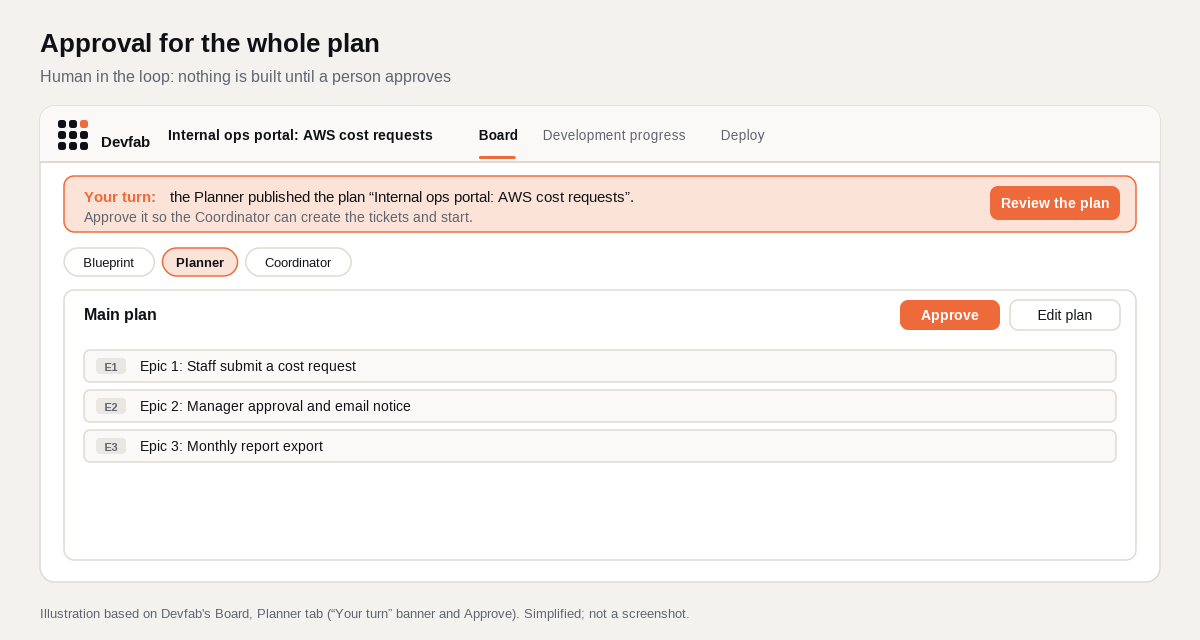
- A plan a person approves. Q made changes "after approval" in the IDE. In Devfab the approval covers the whole plan: "Your turn: the Planner published the plan. Approve it so the Coordinator can create the tickets."
- ChainFlow. Maps which functions and APIs call each other and what is deployed, so developer agents see the impact of a change.
- QA agent. Q scanned code and reviewed PRs. Devfab's QA agent runs UI and flow tests (screens, buttons and user journeys clicked end to end) plus logic tests.
Code stays in your own GitHub account (or your organization's), and you deploy to your own server, including servers on AWS. You can choose the model for each agent or keep Devfab's default.
Devfab's honest limits:
- It's new and in Beta, with a smaller community.
- It has fewer integrations and no AWS console or Identity Center integration.
- It isn't an IDE plugin for hands-on coding.
- It needs a GitHub account; Q also worked with GitLab.
Where Amazon Q Developer is still the better choice
- Until April 30, 2027, if you hold Pro seats. Existing subscriptions keep working, and you can still add users.
- AWS-aware help in your current IDE. Querying your AWS resources from the IDE is something none of the alternatives above document.
- Finishing in-flight Java or .NET transformations. AWS recommends completing them before the cutoff.
- Console help. AWS assistant, the renamed console experience, continues and is offered free for now.
How to choose
- AWS-first team, VS Code or JetBrains users? Kiro.
- Visual Studio or Eclipse users? GitHub Copilot, or Kiro CLI next to your editor.
- Want inference to stay in your AWS account? Claude Code through Bedrock.
- Ready to switch editors? Cursor.
- Want open source and any model? Cline.
- Want whole projects with research, an approved plan, UI and flow tests and deploy to your own server? Devfab.
For legacy Java and .NET work, see best AI tools for legacy system modernization.
FAQ
Is Amazon Q Developer being discontinued?
Yes, for coding. AWS announced on April 30, 2026 that Q Developer IDE plugins and paid subscriptions reach end of support on April 30, 2027. New subscriptions and new Free Tier accounts were blocked from May 15, 2026. AWS points users to Kiro.
What happens to Amazon Q in the AWS console?
It continues under a new name. On November 5, 2026, Amazon Q Developer in the AWS Management Console and Console Mobile Apps was renamed AWS assistant. AWS says it is currently offered free, and existing Pro subscribers keep Pro capabilities.
I use Q Developer in Visual Studio or Eclipse. What should I do?
Kiro has no native plugin for Visual Studio or Eclipse, so you would switch to the Kiro IDE or run Kiro CLI next to your editor. GitHub Copilot supports both Visual Studio and Eclipse, including agent mode, if staying in your IDE matters more than staying with AWS.
What replaces Q Developer's Java upgrade transformation?
Java upgrade and .NET porting transformations also end on April 30, 2027. AWS recommends finishing in-progress work before then and names AWS Transform custom for Java upgrades and AWS Transform full-stack Windows modernization for .NET.
Read next
- What is an AI software factory?
- Kiro alternatives
- Kiro vs GitHub Copilot
- Devfab vs Kiro
- Best AI tools for legacy system modernization
Moving off Q? Bring a repo and approve the plan first. Try the Devfab Beta
Sources (checked November 13, 2026): AWS: Amazon Q Developer end of support; AWS What's New: Q Developer in console renamed AWS assistant (Nov 5, 2026); Amazon Q Developer pricing; Amazon Q Developer: agentic coding; Kiro: Migrating from Q Developer; Kiro: Upgrading from Q CLI; Kiro home; Kiro pricing; Kiro docs: Specs; Kiro changelog; GitHub Docs: Copilot feature matrix; GitHub Docs: Copilot plans; GitHub Copilot plans; GitHub Docs: Copilot cloud agent; Claude Code: Enterprise deployment; Claude Code overview; Claude pricing; Cursor docs: Plan Mode; Cursor docs: Cloud Agents; Cursor pricing; Cursor blog: Joining SpaceX; Cline docs overview; Cline docs: Plan and Act; Cline pricing.
Frequently asked questions
Is Amazon Q Developer being discontinued?
Yes, for coding. AWS announced on April 30, 2026 that Q Developer IDE plugins and paid subscriptions reach end of support on April 30, 2027. New subscriptions and new Free Tier accounts were blocked from May 15, 2026. AWS points users to Kiro.
What happens to Amazon Q in the AWS console?
It continues under a new name. On November 5, 2026, Amazon Q Developer in the AWS Management Console and Console Mobile Apps was renamed AWS assistant. AWS says it is currently offered free, and existing Pro subscribers keep Pro capabilities.
I use Q Developer in Visual Studio or Eclipse. What should I do?
Kiro has no native plugin for Visual Studio or Eclipse, so you would switch to the Kiro IDE or run Kiro CLI next to your editor. GitHub Copilot supports both Visual Studio and Eclipse, including agent mode, if staying in your IDE matters more than staying with AWS.
What replaces Q Developer's Java upgrade transformation?
Java upgrade and .NET porting transformations also end on April 30, 2027. AWS recommends finishing in-progress work before then and names AWS Transform custom for Java upgrades and AWS Transform full-stack Windows modernization for .NET.