Short answer: For AI in every developer's editor, GitHub Copilot and Cursor have the deepest admin controls. Claude Code fits teams that want models in their own cloud account, Tabnine fits air-gapped sites, and Devin offers a single-tenant VPC. Replit and Lovable govern citizen developers. Devfab, in Beta, runs the whole lifecycle with plan approval.
What enterprises need from an AI development platform
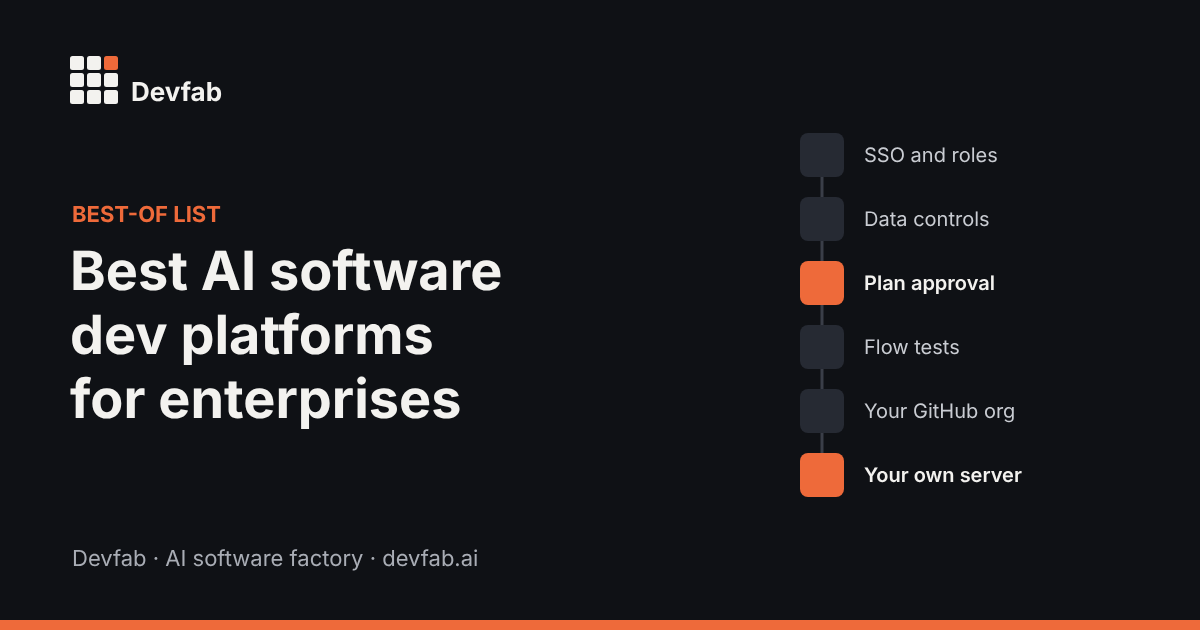
A single developer can try an AI tool on a whim. An enterprise cannot. Before a platform touches company code, security, legal and platform teams ask the same questions:
- Identity. Does it support SSO with our identity provider? Can we provision and remove users automatically (SCIM)?
- Data controls. Is our code used to train models? Where are prompts and code processed and stored? Can we keep data in a region?
- Where it runs. Vendor cloud, a single-tenant VPC, our own cloud account or fully on-premises?
- Governance. Can admins restrict models, agents, repositories and publishing? Are there audit logs, and can they go to our SIEM?
- Compliance. Which certifications does the vendor hold, and can we read the reports?
- Cost control. Seats, credits or usage? Can we set budgets per team?
- Process. Who approves what an agent builds, and how is it tested before it ships?
The last point gets less attention than it should. Most enterprise checklists focus on where data goes. Fewer ask how AI-written changes are planned, reviewed and tested before they reach users.
How we picked and compared
We picked eight platforms that enterprises evaluate for AI-assisted software development, across four types: AI coding assistants and editors, autonomous coding agents, AI app builders for citizen developers, and an AI software factory. We compared them from vendor documentation and dated reviews, checked in November 2026. We did not run hands-on tests or security reviews of our own.
A note on the table: we only list controls we found in documentation we opened. A blank or "not covered" does not mean a tool lacks a feature. It means we could not confirm it from the pages we read. Always check the vendor's trust center and contract.
Quick comparison table
| Platform | Type | SSO | User provisioning | Audit logs | Where it runs | Notable data controls |
|---|---|---|---|---|---|---|
| GitHub Copilot | Assistant and cloud agent | Not covered here | Not covered here | Yes, agent actions flagged | GitHub | Enterprise AI Controls, policies |
| Cursor | AI editor and agents | SAML/OIDC (Teams and up) | SCIM (Enterprise) | Yes (Enterprise) | Your devices; options for where cloud agents run | Enforced privacy mode, model and repo restrictions |
| Claude Code | Coding agent | Via Claude for Teams/Enterprise | Not covered here | Via cloud provider logs when routed there | Anthropic, or your AWS, Google Cloud or Azure account | Managed settings and permissions |
| Tabnine | Assistant and agents | Not covered here | Not covered here | Not covered here | SaaS, VPC, on-premises, air-gapped | Private install, custom model option |
| Devin | Autonomous coding agent | Okta, Entra ID, SAML, OIDC | Not covered here | Not covered here | Vendor cloud or single-tenant VPC | Customer-managed keys (top tier) |
| Replit | App builder and agent | SAML | SCIM | Yes, stream to SIEM | Replit | Private deployments, region locks, model controls |
| Lovable | App builder | Yes (Business and up) | SCIM (Enterprise) | Yes (Enterprise) | Lovable; backend can be self-hosted | No training by default, publishing policies |
| Devfab | AI software factory (Beta) | Not listed (Beta) | Not listed (Beta) | Not listed; Team Delivery Report | Your GitHub; deploy to your own server | Plan approval, per-agent model choice |
The platforms, one by one
GitHub Copilot
Copilot is the default choice for enterprises already on GitHub. It gives inline help in IDEs and a cloud agent: assign an issue to Copilot and it works on the task and opens a pull request for your review. The agent is available on all paid Copilot plans.
For governance, GitHub's Enterprise AI Controls, now generally available, put AI policies in one place in enterprise settings. Admins can delegate them through custom roles. Audit logs flag agent activity and record which user an agent acted for, and admins can filter activity by agent, including third-party agents. Teams can version and distribute custom agent definitions across the enterprise. Enterprise-wide MCP allowlists are still in preview.
Best for: enterprises standardized on GitHub that want AI across every developer's workflow with central policy.
Limits: plans are per user with included AI credits, and agent work and code review draw on those credits, with extra usage metered by default, so set budgets early. Copilot helps developers write and review code; planning, flow testing and delivery around the code are still your process.
Cursor
Cursor is an AI code editor with agents, and its enterprise documentation is detailed. Privacy mode, which means no training on your data by Cursor or other AI providers, is enforced organization-wide on Enterprise. SSO (SAML or OIDC) comes with Teams; SCIM, audit logs and SIEM streaming come with Enterprise. Admins can restrict which models are used, block repositories, enforce agent sandbox mode and control auto-run, browser and network access. Cursor lists SOC 2 Type II, GDPR compliance and HIPAA BAA support for Enterprise customers.
Teams also get shared rules, cloud agents and Bugbot, which reviews pull requests against team rules.
Best for: engineering organizations that want a strong AI editor with granular controls over models and agents.
Limits: it is a developer tool, so it does not help business teams build apps. Usage beyond each seat's pool is billed, so admins need to set spend limits. Several controls are Enterprise-only.
Claude Code
Claude Code is a coding agent that runs in the terminal, IDEs and other surfaces. Its enterprise appeal is deployment flexibility. Organizations can use Claude for Teams or Enterprise, which include SSO, admin tools and server-managed settings, with Enterprise adding role-based permissions and compliance API access. Or they can route model use through Amazon Bedrock, Google Cloud or Microsoft Foundry and use those platforms' IAM policies and audit logs. A self-hosted gateway can put identity-provider sign-in in front of those providers.
Security teams can set managed permissions that local configuration cannot override, limit which providers a machine may use, and pin model versions. Cloud sessions can run on self-hosted environments your organization operates.
Best for: platform teams that want an agentic coding tool inside their existing cloud account and controls.
Limits: it is built for developers, and getting value at scale takes setup: shared instruction files, permissions and MCP servers. Billing depends on route: per-seat plans, or pay-as-you-go through your cloud provider.
Tabnine
Tabnine is an AI coding platform for IDEs and the terminal, with completions, chat and agents that plan and carry out tasks such as refactoring, testing and code review. Its Enterprise plan is the clearest answer in this list for strict environments: it documents secure SaaS, a self-hosted VPC on AWS, Google Cloud or Azure, an on-premises install on your own servers, and fully air-gapped deployment. On self-hosted installs, Tabnine says it has no access to your environment.
Its Context Engine can connect repositories from GitHub, GitLab, Bitbucket or Perforce. Private installs can use a custom model tuned on your code. A review from Real Python notes that Tricentis acquired Tabnine in July 2026, so watch the roadmap.
Best for: regulated or defense-adjacent teams that need AI coding help with no data leaving their network.
Limits: running it on your own infrastructure means you operate a Kubernetes cluster and plan updates. It is a developer assistant, not a delivery process. The acquisition may change plans and packaging.
Devin
Devin is an autonomous coding agent. People start it from the web app, Slack or the API, and each session gets its own workspace with a shell, a browser and an editor. For enterprises, Devin offers three deployment options: Enterprise Cloud (multi-tenant, data encrypted in transit and at rest, each session on its own machine), Customer Dedicated (a single-tenant VPC hosted by Cognition and connected to your network by AWS PrivateLink or an IPSec tunnel) and Enterprise Assured, which adds customer-managed keys. SSO guides cover Okta, Microsoft Entra ID, SAML 2.0 and OpenID Connect.
Best for: enterprises that want to delegate well-scoped engineering tasks to an agent that can reach private systems.
Limits: Devin's planning "brain" always runs in Cognition's cloud, even in the VPC model, and its docs say it does not accept third-party model API keys. Agents work best on clear, well-scoped tasks.
Replit
Replit is aimed at teams that build internal tools and apps with an agent, including non-developers. Its Enterprise plan has SAML SSO with SCIM, role-based permissions mapped to identity provider groups, and audit logs you can stream to your SIEM. Admins can require private deployments, block public apps, enforce security scans before deploy and lock deployments to specific regions. A Security Center tracks dependency vulnerabilities across projects with SBOM downloads, and admins choose which model providers each workspace can use.
Best for: enterprises that want business teams to build internal apps inside guardrails IT controls.
Limits: apps run on Replit's platform. The Enterprise page we read does not list certifications, so ask for them. Agent usage is effort-based, so cost per app varies.
Lovable
Lovable is a chat-based app builder with one of the fullest enterprise documents in this category. SSO (Okta, Entra ID or any OIDC or SAML provider) is on Business and Enterprise; SCIM, audit logs with SIEM export and publishing policies (block or require approval) are on Enterprise. Workspace data is excluded from model training by default, and Enterprise workspaces use zero-data-retention models by default. Lovable lists SOC 2 Type II, ISO 27001:2022 and GDPR with a data processing agreement. A security scan runs on every publish.
For code control, Enterprise can connect GitHub Enterprise Server, and you can sync to GitLab or move the backend and database to infrastructure you run.
Best for: enterprises that want product, design and business teams to prototype and ship web apps with strong admin controls.
Limits: the builder itself is a hosted service; self-hosting covers your code and backend, not Lovable. Credits are shared per workspace, and several governance controls are Enterprise-only.
Devfab
Devfab is a Software Factory in the Autonomous Software Lifecycle category. Coding agents automate the developer. Devfab automates the development lifecycle. That is a different job from the tools above: instead of helping one developer or one builder, it runs a project from research and plan to tested, deployed app with seven agents (Researcher, Planner, Coordinator, Developers, Blueprint, QA agent and Deploy).
For enterprise teams, the controls are in the process:
- A person approves the plan. Human in the loop is the default run mode: Devfab works step by step and waits for your review and approval before the next stage. Auto mode exists, and you can switch in workspace settings.
- Research before planning. The research step maps the domain, best practices and competitors before the Planner writes anything.
- ChainFlow on existing systems. Connect an existing repository and leave the change box empty: Devfab maps the code first, showing which functions and APIs call each other and what is deployed, and suggests three small first tickets. Developer agents see the impact of a change before they make it.
- QA before Done. The QA agent runs UI and flow tests that click through screens and user journeys end to end, plus logic tests. "QA agent · review before Done" keeps tickets from closing without review.
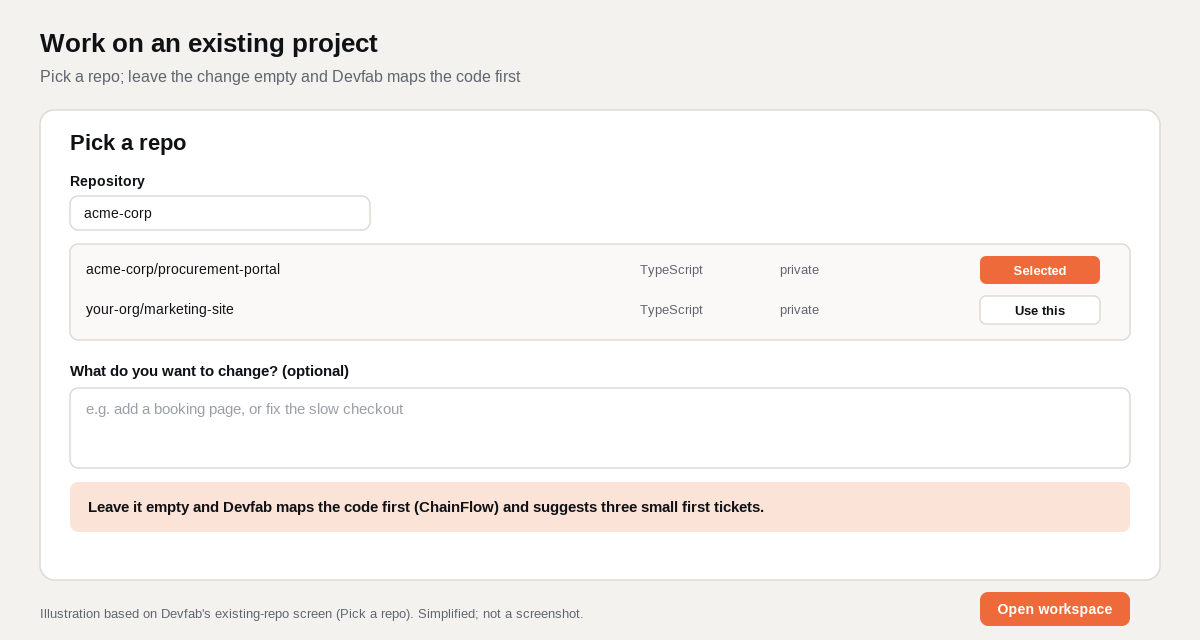
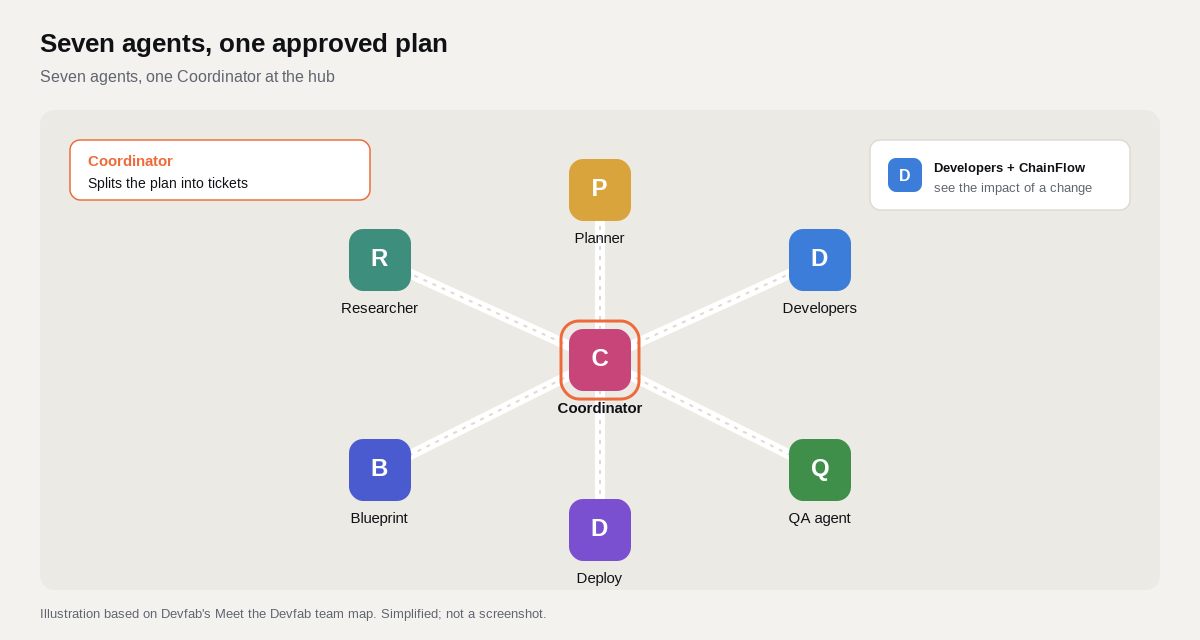
On ownership and hosting, Devfab keeps code in your own GitHub account or your organization's, and you deploy to your own server, with an optional custom domain. There is no lock-in. You can choose the model for each agent or keep Devfab's default. Roles and workspace permissions control who sees what, and a Team Delivery Report shows what was delivered. Cost is logged after each run, per task and per project, which gives finance a predictable cost record by team and project.
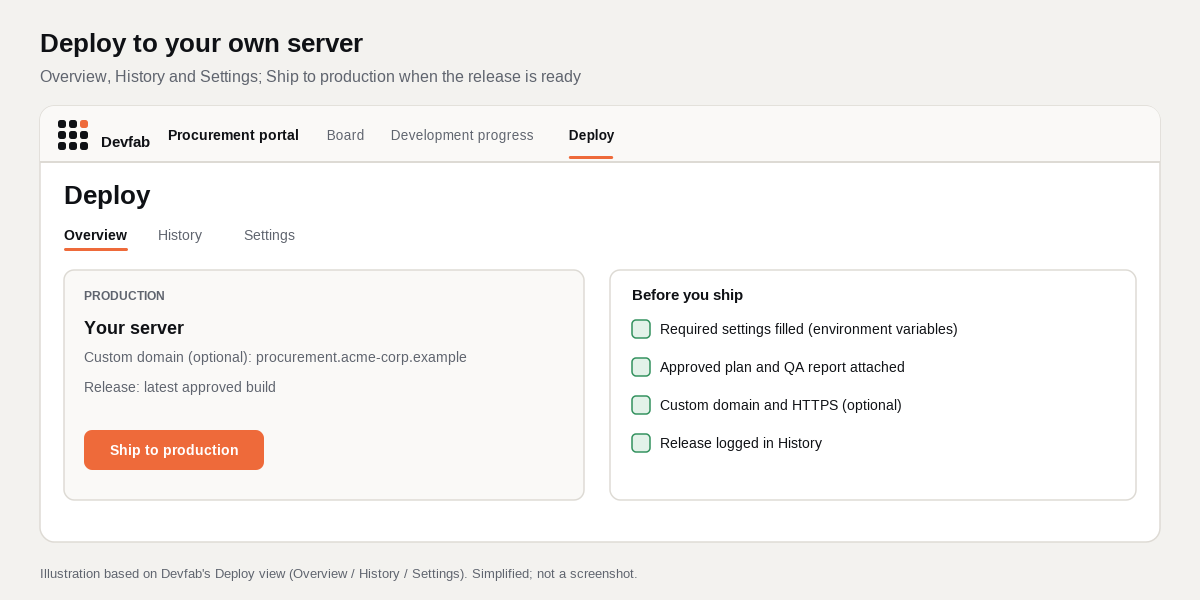
Best for: enterprise innovation, IT and delivery teams, and the agencies that serve them, who want new internal apps and changes to existing ones planned, approved, tested and deployed on company infrastructure.
Honest limits: read these before a security review.
- Devfab is in Beta. It is new, with a smaller community than every other tool here.
- We do not list SSO, SCIM or security certifications for Devfab on this page. If your policy requires them, treat Devfab as a pilot for a scoped project, not an enterprise-wide rollout, and ask the team for current security details.
- It has fewer integrations than established platforms.
- It is not an editor for hands-on coding; pair it with Copilot, Cursor or Claude Code for that.
- It needs a GitHub account or organization. Other source hosts are not covered here.
How to choose
Start from your hardest constraint, then fit the rest.
- No data may leave our network: Tabnine's air-gapped or on-premises install.
- Models must run in our own cloud account: Claude Code through Bedrock, Google Cloud or Foundry.
- Agents need to reach private systems through a dedicated network link: Devin's single-tenant VPC.
- We are on GitHub and want AI for every developer with central policy: GitHub Copilot.
- We want the most granular controls over an AI editor: Cursor Enterprise.
- Business teams need to build apps inside IT guardrails: Replit or Lovable Enterprise.
- We want new apps planned, approved, tested and deployed on our servers, with cost per task: pilot Devfab on one scoped project.
These are not either-or choices. Many enterprises run an assistant for every developer, a coding agent for backlogs and a governed lifecycle tool for new apps. To see how the categories differ, read what an AI software factory is and AI software factory vs AI coding tools.
FAQ
What is an AI software development platform?
A tool that uses AI to help write, test or ship software. In enterprises the term covers AI coding assistants, autonomous coding agents, AI app builders and AI software factories that run the whole development lifecycle.
Which AI coding platform can run fully on-premises?
Of the tools we reviewed, Tabnine documents VPC, on-premises and fully air-gapped installs on its Enterprise plan. Devin offers a single-tenant VPC hosted by its vendor, and Claude Code can route model use through your AWS, Google Cloud or Azure account.
What should enterprises check before buying an AI development platform?
SSO and user provisioning, audit logs, whether your code is used for training, where models and agents run, admin controls over models and agents, security certifications, and how usage is billed and capped.
Is Devfab ready for enterprise use?
Devfab is in Beta. It keeps code in your organization's GitHub and deploys to your own server, with human approval of every plan. It does not list SSO or security certifications here, so start with a scoped pilot and ask the team for security details.
Can enterprises use more than one AI development platform?
Yes, and most do. A common setup is an AI assistant in every developer's editor, a coding agent for well-scoped tickets, and a governed lifecycle tool for new internal apps.
Read next
- What is an AI software factory?
- AI software factory vs AI coding tools
- Devfab vs GitHub Copilot
- Devfab vs Cursor
- How to use AI agents on a large existing codebase
Pilot one scoped project: approve the plan, keep the code in your organization's GitHub and deploy to your own server. Try Beta
Sources (checked November 2026): GitHub Docs: Choosing your enterprise's plan for Copilot; GitHub Docs: Kick off a task with Copilot agents; GitHub Changelog: Enterprise AI Controls GA (Feb 2026); Cursor Docs: Enterprise; Cursor Teams; Cursor Docs: Team pricing; Claude Code Docs: Enterprise deployment overview; Tabnine Docs: Deployment options; Real Python: Tabnine; Devin Docs: Enterprise deployment overview; Devin Docs: VPC deployment; Replit Docs: Replit Enterprise; Replit Docs: Teams; Lovable Docs: Lovable for enterprise; Lovable Docs: Collaboration.
Frequently asked questions
What is an AI software development platform?
A tool that uses AI to help write, test or ship software. In enterprises the term covers AI coding assistants, autonomous coding agents, AI app builders and AI software factories that run the whole development lifecycle.
Which AI coding platform can run fully on-premises?
Of the tools we reviewed, Tabnine documents VPC, on-premises and fully air-gapped installs on its Enterprise plan. Devin offers a single-tenant VPC hosted by its vendor, and Claude Code can route model use through your AWS, Google Cloud or Azure account.
What should enterprises check before buying an AI development platform?
SSO and user provisioning, audit logs, whether your code is used for training, where models and agents run, admin controls over models and agents, security certifications, and how usage is billed and capped.
Is Devfab ready for enterprise use?
Devfab is in Beta. It keeps code in your organization's GitHub and deploys to your own server, with human approval of every plan. It does not list SSO or security certifications here, so start with a scoped pilot and ask the team for security details.
Can enterprises use more than one AI development platform?
Yes, and most do. A common setup is an AI assistant in every developer's editor, a coding agent for well-scoped tickets, and a governed lifecycle tool for new internal apps.