Short answer: Glide wins when your operations already run on Excel or Google Sheets and staff need a phone-friendly app on that data, built by Glide's agent. Airtable wins when you want the data itself in a structured base, with Omni building tables, automations and interfaces, and finer control over who edits what.
You run a warehouse, a clinic front desk or a sales team, and the spreadsheet is the system. Now someone wants an app on top of it.
One camp says keep the sheet and wrap an app around it. The other says move the data into a real database first. Glide and Airtable stand for those two camps, and both rebuilt their products in 2026. This page acts as referee, using vendor pages checked on November 20, 2026.
In this comparison:
- Glide and Airtable at a glance
- Feature comparison
- Cost model by team size
- Where Glide wins
- Where Airtable wins
The status changes come first, because they affect what you'd be buying.
Glide and Airtable at a glance
Airtable has a new owner. Bending Spoons closed its acquisition of Airtable in early September 2026. On October 12, 2026, Airtable announced layoffs of much of the pre-acquisition team and said plans and pricing stay unchanged (Airtable newsroom; Airtable community update). On October 21 the Fall Release shipped Omni 2.0, the Airtable Canvas open beta and agent audit logs (Airtable Fall Release).
Airtable is a no-code database and app platform. Its assistant, Omni, builds tables, fields, automations, dashboards and interface pages from plain language (Airtable support).
Glide is now GlideOS. Glide announced "an entirely new version of our product" on March 5, 2026, and staff said the new platform was live on June 4 (Glide community). The old builder continues as Glide Classic, with no sunset date stated (Glide Classic). GlideOS is a separate subscription, and there is no migration tool from Classic yet (Glide pricing).
GlideOS turns the spreadsheets a business runs on into internal apps, workflows and agents. It targets operations teams in supply chain, manufacturing, retail, real estate and hospitality (Glide).
Feature comparison
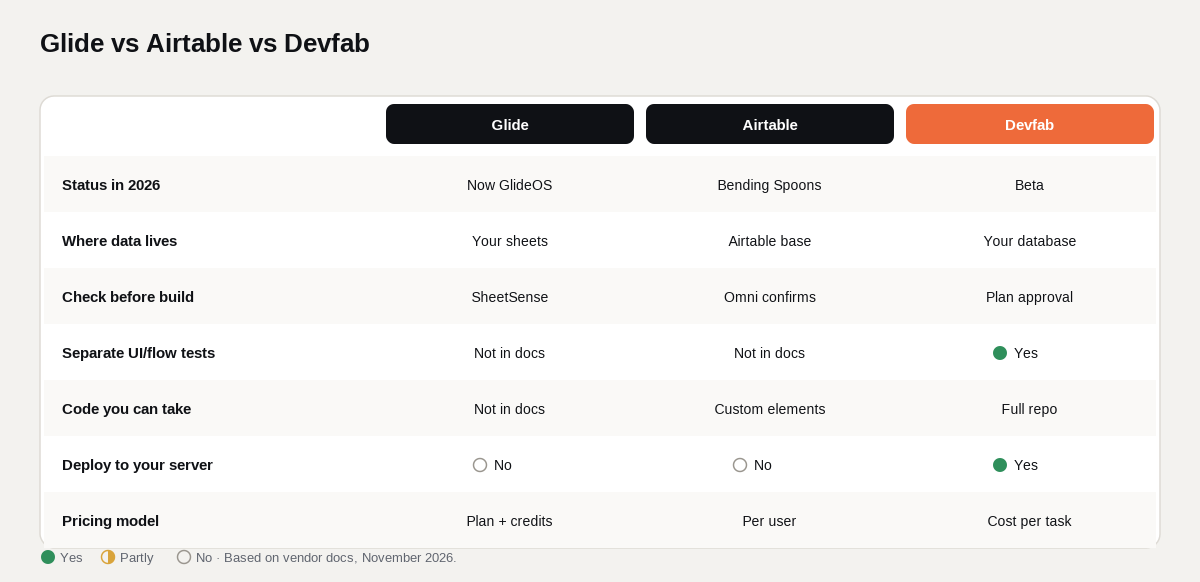
| Aspect | Glide (GlideOS) | Airtable | Source |
|---|---|---|---|
| Where it runs | Hosted; apps for desktop and phone | Web app, Mac and Windows apps | Glide; Airtable community |
| Where the data lives | Your Excel, Google Sheets, Airtable, Notion or Snowflake, plus about 150 integrations | Airtable bases | Glide; Airtable support |
| Planning and spec | SheetSense scans formulas, macros and pivot tables and asks you to confirm before it builds | Omni 2.0 builds data models from spreadsheets, PDFs and images | GlideOS recap; Airtable Fall Release |
| Agent autonomy | Agent builds apps, then can operate them, query data and run code | Omni asks before deletions; you publish interfaces and turn on automations yourself | GlideOS recap; Airtable support |
| Testing | Not covered in the pages we checked | Not covered in the pages we checked | — |
| Code ownership | Not covered in the pages we checked | Custom element code editable in the browser or downloadable | Airtable community |
| Team and admin | AI spend budgets by team and model; SSO on Enterprise | MCP on/off org-wide; agent audit logs on Enterprise | Glide pricing; Airtable Fall Release |
| Model choice | Approved models only; Enterprise picks its LLM provider | Custom elements use Anthropic and OpenAI models only | Glide; Airtable community |
| Pricing model | Per plan, with credits that meter LLM token use | Per billable collaborator, plus pooled AI credits; building with Omni uses no credits | Glide pricing; Airtable AI billing |
Cost model by team size
| Team size | Glide (GlideOS) | Airtable | Devfab |
|---|---|---|---|
| 1 person | Free (cannot publish apps) or Basic, USD 25 per month | Free (record, run and collaborator caps) or Team, USD 20 per user per month billed annually | Cost logged per task and per project (Beta) |
| 5 people | Pro, USD 125 per month, team members starting at 5, 50 credits per member | Team, USD 20 per user per month billed annually | Cost logged per task and per project (Beta) |
| 25 people | Pro scales by seat count, or Enterprise (custom, with SSO) | Business, USD 45 per user per month billed annually, or Enterprise Scale (custom) | Cost logged per task and per project (Beta) |
Prices as of November 2026 from Glide pricing and Airtable pricing. Glide's lower tiers cap team members, published apps and workflows. Devfab is in Beta and offers predictable cost: cost is logged after each run, per task and per project.
One caution on Glide credits: a community thread from June 2026 says credit costs are hard to predict and that agent mistakes still use credits. Glide staff called credit transparency "one of the biggest pieces of feedback" (Glide community).
Where Glide wins
- Your data must stay in Excel or Google Sheets. GlideOS builds on top of them instead of asking you to move.
- Spreadsheet logic matters. SheetSense reads formulas, macros and pivot tables before it builds.
- Staff work on phones. A warehouse picking app or a site checklist runs on desktop and phone.
- You want ready-made systems. The App Store has multi-app templates that are free to copy.
- You want to cap AI spend by team and by model.
Where Airtable wins
- You want a real database, not a spreadsheet, as the source of truth.
- Building should not burn credits. Omni builds apps, agents and bases without using AI credits; only Q&A does.
- You need custom code in places. AI-generated custom elements can be edited or downloaded.
- You want guardrails on the agent. Omni confirms deletions and leaves publishing to you; Canvas asks before adding tables or fields.
- Your AI tools already speak MCP. Airtable MCP works with Claude, ChatGPT, Gemini and Cursor.
Know Airtable's gaps, too. Omni can't create new views, set up syncs or export data, and Canvas is unavailable for HIPAA-compliant or non-US-data organizations (Airtable support; Airtable Fall Release).
Switching from one to the other
From Airtable to Glide. You may not need to move data at all. Glide lists Airtable as a data source, so you can point a GlideOS app at your existing base (Glide). Rebuild screens with the Glide agent and check each one against the old interface.
From Glide to Airtable. Your records already sit in your sheets, so import them into a new base. Then ask Omni to build the interfaces and automations. Omni 2.0 can build a data model straight from a spreadsheet (Airtable Fall Release). If you're on Glide Classic, note that GlideOS has no migration tool from Classic yet.
Where Devfab fits
Both tools are strong when the app is mostly data, views and simple workflows run inside the vendor's platform. Neither, in the pages we checked, plans a whole project for a person to approve, runs separate UI and flow tests, or deploys a codebase to your own server.
App builders automate the first version. Devfab automates the development lifecycle. Its Researcher maps the domain before the Planner writes a plan, a person approves the plan, and the QA agent runs UI, flow and logic tests. The code lives in your own GitHub account. Devfab is in Beta, with a smaller community, fewer integrations than mature platforms, and no spreadsheet-first builder. See Devfab vs Glide and Devfab vs Airtable.
FAQ
Is Glide or Airtable better for a team that lives in Excel?
Glide. GlideOS is built to turn the Excel files and Google Sheets a business already runs on into apps, and its SheetSense step scans formulas, macros and pivot tables before it builds. Airtable's Omni 2.0 can build a data model from a spreadsheet, but the data then lives in an Airtable base.
Did anything change at Airtable or Glide in 2026?
Both changed a lot. Bending Spoons closed its purchase of Airtable in early September 2026 and announced layoffs on October 12, saying plans and pricing stay the same. Glide relaunched as GlideOS, live since June 2026, and the old builder continues as Glide Classic with no migration tool yet.
Can I use Glide and Airtable together?
Yes. Glide lists Airtable among its data sources, next to Excel, Google Sheets, Notion and Snowflake. Some teams keep records in Airtable and put a Glide app on top for staff on phones.
Which one costs less for a team of five?
It depends on use. As of November 2026, Airtable Team is USD 20 per user per month billed annually, and Glide Pro is USD 125 per month with team members starting at five. Glide also meters AI work in credits, so heavy agent use adds cost.
Read next
Outgrown the spreadsheet app? Try Beta
Sources (checked November 2026): Glide; Glide pricing; GlideOS launch recap; Glide Classic; Glide community: Introducing a new Glide (Mar 5, 2026); Glide community: Pricing issues with GlideOS (Jun 2026); Airtable pricing; Airtable newsroom: Back to bases (Oct 12, 2026); Airtable community: An update on Airtable's team (Oct 12, 2026); Airtable Fall Release (Oct 21, 2026); Airtable: AI-generated custom elements out of beta; Airtable support: Using Omni; Airtable AI billing; Airtable plans overview.
Frequently asked questions
Is Glide or Airtable better for a team that lives in Excel?
Glide. GlideOS is built to turn the Excel files and Google Sheets a business already runs on into apps, and its SheetSense step scans formulas, macros and pivot tables before it builds. Airtable's Omni 2.0 can build a data model from a spreadsheet, but the data then lives in an Airtable base.
Did anything change at Airtable or Glide in 2026?
Both changed a lot. Bending Spoons closed its purchase of Airtable in early September 2026 and announced layoffs on October 12, saying plans and pricing stay the same. Glide relaunched as GlideOS, live since June 2026, and the old builder continues as Glide Classic with no migration tool yet.
Can I use Glide and Airtable together?
Yes. Glide lists Airtable among its data sources, next to Excel, Google Sheets, Notion and Snowflake. Some teams keep records in Airtable and put a Glide app on top for staff on phones.
Which one costs less for a team of five?
It depends on use. As of November 2026, Airtable Team is USD 20 per user per month billed annually, and Glide Pro is USD 125 per month with team members starting at five. Glide also meters AI work in credits, so heavy agent use adds cost.