Short answer: Superblocks wins when a large enterprise wants many builders creating internal apps with an AI agent, every change scanned by security agents, and inference inside its own AWS, GCP or Azure account. Budibase wins when IT in a regulated organization wants open-source, self-hosted agents that handle requests and stop for human approval.
A water utility gets thousands of service requests: leak reports, meter disputes, payment plans. Some need a dashboard for staff. Others could be handled by an agent, if someone signs off before refunds go out.
Superblocks and Budibase both sell to regulated buyers, but they start from different places. One starts from the app. The other starts from the agent. This page compares them on vendor pages checked in November 2026.
In this comparison:
- Superblocks and Budibase at a glance
- Feature comparison
- Cost model by team size
- Where Superblocks wins
- Where Budibase wins
Read it with your security questionnaire open.
Superblocks and Budibase at a glance
Both shipped major releases in 2026. Superblocks 3.0 arrived on August 3, 2026, with an AWS strategic partnership, in-VPC deployment with Bedrock inference, security agents and deterministic scanners on each code change, and a Smart Router across models (Superblocks 3.0). Budibase 4.0 launched on November 10, 2026, moving agents to "ready for real-world operations" (Budibase 4.0).
Superblocks is an enterprise platform where business and engineering teams build internal apps with the Clark agent: chat to generate, refine in a visual editor, then extend by "editing the underlying React framework" (Clark docs). Clark remembers code policies, design systems, audit rules and data mappings (Superblocks 2.0).
Budibase is an open-source platform for IT teams to build AI agents, apps and automations around existing systems. It says it is "Built for regulated enterprises," with pages for public sector, finance, utilities and manufacturing (Budibase). The core is GPL v3 and has about 28.3k GitHub stars (GitHub). Its pricing page now shows Community, Cloud and Enterprise, a different lineup from the one a reviewer saw in September, so check plans before you budget (Budibase pricing).
Feature comparison
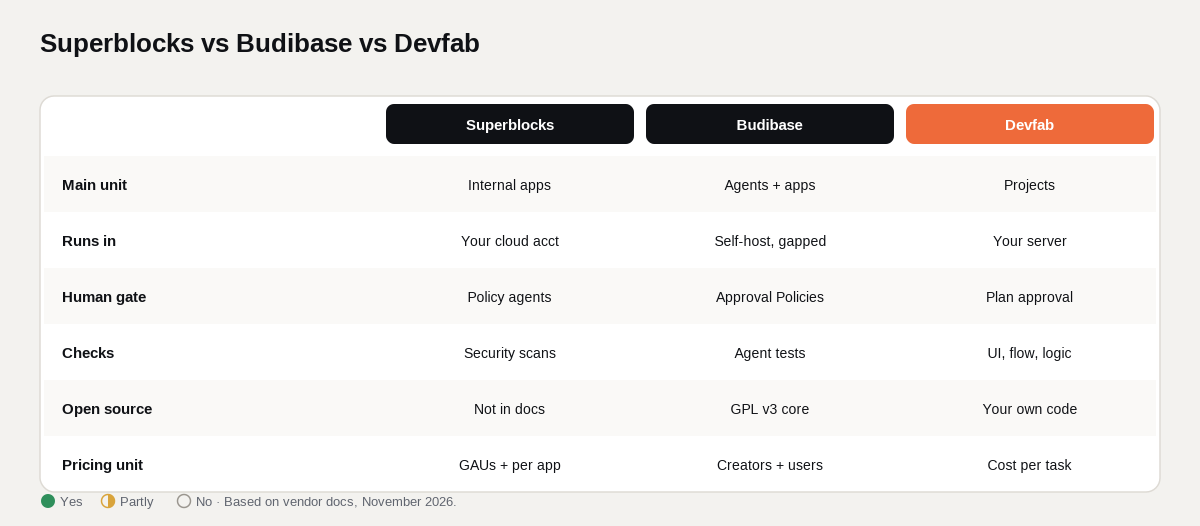
| Aspect | Superblocks | Budibase | Source |
|---|---|---|---|
| Where it runs | Cloud, Hybrid, or Cloud-Prem in your AWS, GCP or Azure account | Budibase Cloud, or self-host on private cloud, on-premise or air-gapped | Superblocks stack post; Budibase |
| Main unit of work | Internal apps built with Clark | Agents (Operations), apps and automations | Clark docs; Budibase 4.0 |
| Human approval | Custom Policy Agents and security review of code changes | Approval Policies decide when a human must step in; approvals in Slack and Teams | Superblocks 3.0; Budibase 4.0 |
| Testing | Security agents, SBOM and CVE scans per app | Agent testing tools and agent audit logs | Superblocks 3.0; Budibase 4.0 |
| Code and Git | GitHub, GitLab, Bitbucket, Azure DevOps | Open-source core; Projects export as reusable templates | Superblocks stack post; Budibase 4.0 |
| Admin and compliance | RBAC, SSO, always-on audit logs; SOC 2, GDPR, HIPAA-eligible | Granular roles, SSO and SCIM; ISO 27001, Iron Bank images | Superblocks stack post; Budibase |
| Model choice | Bedrock, Vertex AI, Azure AI, Snowflake Cortex, Databricks; Smart Router | Any OpenAI-format model through LiteLLM, incl. open-source | Superblocks 2.0; Budibase 2026 post |
| Pricing model | Governed Agent Units plus a charge per published app | Free Community; Cloud subscription with creators, end users, actions and AI credits | Superblocks billing; Budibase pricing |
Cost model by team size
| Team size | Superblocks | Budibase |
|---|---|---|
| 1 person | No free tier, per a competitor review; Teams self-serve plan with a GAU pool | Community USD 0, self-managed, bring your own AI key |
| 5 people | Teams plan: org-wide GAU pool, packs, auto-refills, per-user spend limits | Community (free), or Cloud from USD 299 per month |
| 25 people | Enterprise dollar-commit contract; no per-seat builder or end-user fees | Cloud plus add-ons: creators USD 50 and end users USD 5 per user per month (annual); or Enterprise custom |
Budibase prices as of November 2026 from Budibase pricing. Superblocks lists no plan prices on its pricing page; the model is from its billing docs. Both have metering to watch: Budibase Cloud actions are hard monthly limits, and Superblocks GAU refills mean the base subscription may not cap the invoice, per competitor reviews (Jet Admin on Budibase; Jet Admin on Superblocks).
Where Superblocks wins
- Lots of builders, one policy layer. Clark carries code policies and design systems, and the enterprise license has no per-seat fees.
- Each code change gets a security review. Security agents, deterministic scanners and per-app SBOM and CVE scans.
- Inference inside your AWS account. In-VPC deployment with Bedrock is the 3.0 headline.
- Developers can drop into React. Clark output is extendable in code, with Git on four major hosts.
Where Budibase wins
- Agents that handle requests, with sign-off rules. Approval Policies and tool-level permissions decide what an agent may do alone.
- Air-gapped and open source. GPL v3 core, Iron Bank images and air-gapped Enterprise installs.
- Free to start in-house. Community is unlimited for users, apps, agents and automations when self-managed, though it has one workspace and short automation log retention.
- Your own small models. LiteLLM lets IT point agents at open-source models it runs.
- Staff stay in chat. Approvals and file submissions work in Slack and Teams.
Switching from one to the other
Neither vendor documents a direct migration path in the pages we checked. Both connect to existing databases and APIs, so start by pointing the new platform at the same data. Moving to Superblocks, use 3.0's prototype import for raw code or let Clark regenerate the screens. Moving to Budibase, rebuild the data tables and service portal first, then add agents with Approval Policies for the requests you want handled automatically.
Where Devfab fits
Both platforms run your apps inside their runtime. The utility's staff dashboard fits that well. A customer-facing account portal that the utility owns as code, deploys to its own servers and hands to a contractor later is a different job.
Coding agents automate the developer. Devfab automates the development lifecycle. Its Researcher maps the domain first (tariffs, meter reads, payment plans, how other utility portals work) and suggests a prototype. A person approves the plan, and the Coordinator splits it into tickets. The QA agent runs UI and flow tests (screens, buttons and user journeys clicked end to end) plus logic tests. Devfab is in Beta, with a smaller community and fewer integrations than either platform. See Devfab vs Superblocks and Devfab vs Budibase.
FAQ
What is the main difference between Superblocks and Budibase?
Superblocks centers on building internal apps with its Clark agent under central IT policy, with security agents reviewing each change. Budibase 4.0 centers on running AI agents in operations, with Approval Policies that decide when a person must step in, plus apps and automations around them.
Which one can run air-gapped?
Budibase lists air-gapped self-hosting, and its Enterprise plan covers self-managed installs including air-gapped. Superblocks offers Cloud, Hybrid and Cloud-Prem inside your AWS, GCP or Azure account; air-gapped operation is not covered in the Superblocks pages we checked.
Is there a free option?
Budibase Community is free when self-managed, with unlimited users, apps, agents and automations, and you bring your own AI key. A competitor review says Superblocks has no free tier; its self-serve Teams plan uses a pool of Governed Agent Units.
Which models can each one use?
Superblocks routes to approved models from AWS Bedrock, GCP Vertex AI, Azure AI, Snowflake Cortex and Databricks, with a Smart Router in 3.0. Budibase supports any OpenAI-format model through LiteLLM, including open-source models you host yourself.
Read next
Need a customer portal the utility owns as code? Try Beta
Sources (checked November 2026): Superblocks pricing; Superblocks 3.0 (Aug 3, 2026); Announcing Superblocks 2.0 (Apr 15, 2026); The AI-native enterprise tooling stack (Superblocks, Mar 17, 2026); Clark AI docs; Superblocks billing overview; Jet Admin: Superblocks review (competitor, Sep 30, 2026); Budibase homepage; Budibase pricing; Introducing Budibase 4.0 (Nov 10, 2026); Budibase 2026: the AI workflow toolkit (Dec 8, 2025); Budibase on GitHub; Jet Admin: Budibase review (competitor, Sep 30, 2026).
Frequently asked questions
What is the main difference between Superblocks and Budibase?
Superblocks centers on building internal apps with its Clark agent under central IT policy, with security agents reviewing each change. Budibase 4.0 centers on running AI agents in operations, with Approval Policies that decide when a person must step in, plus apps and automations around them.
Which one can run air-gapped?
Budibase lists air-gapped self-hosting, and its Enterprise plan covers self-managed installs including air-gapped. Superblocks offers Cloud, Hybrid and Cloud-Prem inside your AWS, GCP or Azure account; air-gapped operation is not covered in the Superblocks pages we checked.
Is there a free option?
Budibase Community is free when self-managed, with unlimited users, apps, agents and automations, and you bring your own AI key. A competitor review says Superblocks has no free tier; its self-serve Teams plan uses a pool of Governed Agent Units.
Which models can each one use?
Superblocks routes to approved models from AWS Bedrock, GCP Vertex AI, Azure AI, Snowflake Cortex and Databricks, with a Smart Router in 3.0. Budibase supports any OpenAI-format model through LiteLLM, including open-source models you host yourself.