Short answer: Windsurf is now Devin Desktop. If you want something else, the main alternatives are Cursor (the closest AI editor), GitHub Copilot (in your current IDE and on GitHub), Kiro (spec-driven agentic IDE), Claude Code and OpenAI Codex (coding agents across terminal, IDE and cloud) and Devfab (an AI software factory for planned, tested delivery).
You liked Windsurf, and then it changed its name. Your editor now opens on an agent board, under the Devin brand.
Some people say stay, since settings and plans carried over. Others say it's time to switch editors. This page weighs both, using vendor docs and 2026 reviews.
In this comparison:
- What happened to Windsurf
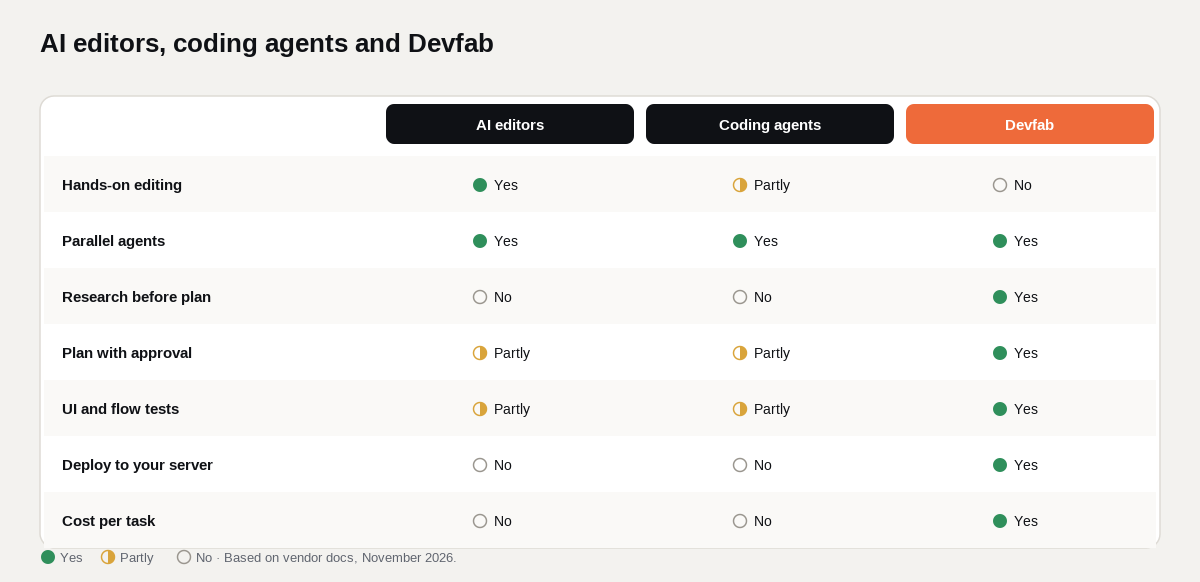
- Six alternatives in one feature table
- Where Devin Desktop is still the better choice
- Where Devfab fits
- How to choose
Jump to the section that matches your situation.
First: what happened to Windsurf
We checked this because many "Windsurf alternatives" lists are out of date. Cognition, which makes Devin, acquired Windsurf's parent company in 2025. Windsurf 2.0 in April 2026 added an Agent Command Center and bundled Devin's cloud agent. Then, on June 2, 2026, Windsurf became Devin Desktop through a normal over-the-air update. Devin's FAQ calls it the same IDE with the same features under the Devin brand.
What changed for users:
- The Agent Command Center is the default screen. It's a Kanban-style board of local and cloud agent sessions. The classic editor, extensions, keybindings and language servers are still there, and settings carried over.
- Cascade was replaced. Devin Local replaced Cascade, Windsurf's agent, and Cascade was scheduled to go away on July 1, 2026.
- Pricing stayed the same. Existing plans, including legacy Windsurf Enterprise plans, kept their pricing. Users on prompt-based credits stayed on them.
- JetBrains plugin in maintenance mode. The Windsurf JetBrains plugin is in maintenance mode; Devin's FAQ recommends using Devin over the Agent Client Protocol (ACP) instead.
- Other agents can plug in. Through ACP, Devin Desktop can host agents such as Codex or Claude Agent.
So "Windsurf alternatives" in late 2026 really means alternatives to Devin Desktop.
Why teams look for alternatives
- The agent-board-first layout. Developers who want to open straight into code have to adjust, and a 2026 review calls the fleet-manager design extra complexity for solo developers.
- Cascade migration. Scripts, docs and integrations built around Cascade had to move.
- JetBrains users. With the plugin in maintenance mode, JetBrains teams want a tool with first-class support.
- Admin work. Device-management allowlists that still list "Windsurf" need updating.
- More than an editor. Agencies and product teams need plan sign-off, QA evidence and deployment that an editor doesn't provide.
How we compared
We compared tools on what each is built for, using vendor documentation and independent reviews as of November 2026. We did not run hands-on tests for this page. We describe pricing models (seats, credits, usage) rather than prices.
Shortlist with a feature table
| Tool | Type | Where you work | Pricing model | Planning style | Beyond code |
|---|---|---|---|---|---|
| Devin Desktop (formerly Windsurf, baseline) | AI editor + agent board | Desktop app; JetBrains via ACP | Plans; prompt credits or usage | Agent sessions | Hand-off to Devin cloud agent |
| Cursor | Agent-first AI editor | Editor, cloud agents | Credits | Agent sessions | PR review agent |
| GitHub Copilot | Assistant + agents | VS Code, JetBrains and more; GitHub | Copilot plans | Agent mode; cloud agent | Code review on GitHub |
| Kiro | Spec-driven agentic IDE | IDE, CLI, web, ACP IDEs | Credits; pooled for teams | Requirements, design, tasks | Agent hooks for tests and docs |
| Claude Code | Coding agent | Terminal, IDE, desktop, web | Claude subscription or API account | Plan review in IDE | Code review, CI automation |
| OpenAI Codex | Coding agent | CLI, IDE, desktop app, cloud | Included in ChatGPT plans | Up to you | Up to you |
| Devfab | AI software factory | Web workspace + your GitHub | Cost logged per task and per project | Research, then a plan a person approves | QA agent, deploy, docs |
Cursor
Cursor 3, released in April 2026, rebuilt the editor around an Agents Window where you run several agents in parallel, local or in cloud VMs. Cloud agents clone your GitHub repo, work on a branch, and can check UI changes in a browser. Sessions can move between cloud and local. It's still a VS Code-based editor with your extensions and keybindings, and billing is credit-based. Cursor is now owned by SpaceX: its August 14, 2026 post says the acquisition officially closed.
Best for developers who liked Windsurf's AI editor and want the closest match. Limits: reviewers say credit use is hard to predict, and cloud agents need the repo on GitHub. See Devfab vs Cursor.
GitHub Copilot
Copilot works inside VS Code, JetBrains IDEs (with what GitHub calls its broadest editor integration) and other IDEs, with completions, chat, agent mode, parallel agent sessions and model choice, including bring-your-own-key. On GitHub, its cloud agent takes an issue and opens a pull request.
Best for teams who don't want to switch editors, and JetBrains users who lost first-class Windsurf support. Limits: cloud agent tasks are one branch and one pull request each, on GitHub-hosted repos only.
Kiro
Kiro is an agentic IDE from a team within AWS. Its main idea is spec-driven development: it turns a prompt into requirements, a design and a list of tasks, which agents then build. Agent hooks run background work such as updating docs or writing unit tests. Kiro subscriptions also cover a CLI, a web version and ACP-compatible IDEs, and credits are pooled for teams.
Best for developers who want structure before code without leaving the editor. Limits: the spec is still reviewed and run by a developer in an IDE; deployment and team delivery are up to you. See Devfab vs Kiro.
Claude Code
Claude Code runs in the terminal, VS Code, JetBrains, a desktop app and the browser. It can open pull requests, run in CI for code review and issue triage, take bug reports from Slack and connect to other tools through MCP. Project instructions, skills and hooks let a team shape how it works.
Best for developers who'd rather work with an agent than an AI editor. Limits: it's a developer tool; plan approval, QA evidence and hosting are your job.
OpenAI Codex
Codex is available as a CLI, a VS Code extension that works with most VS Code forks, in the ChatGPT desktop app and in Codex Cloud. It's included in all ChatGPT plans with usage limits; cloud tasks need Plus or a higher plan.
Best for teams already paying for ChatGPT. Limits: like other agents, it doesn't organize the whole project for you.
Devfab
Devfab isn't an editor. It's an AI software factory that runs a project from research and an approved plan to a tested app on your own server. See Where Devfab fits and our Devfab vs Windsurf comparison.
Where Windsurf (Devin Desktop) is still the better choice
- You liked Windsurf and the change works for you. Settings, extensions and plans carried over. Staying costs nothing.
- You want local and cloud agents on one board. The Agent Command Center plus hand-off to Devin's cloud agent is a strong setup for running many tasks.
- You want to plug in other agents. ACP support lets you run other vendors' agents inside the same app.
- Hands-on coding. For writing and editing code yourself with AI help, an AI editor is the right tool. Devfab is not an editor.
- Maturity. Devin Desktop builds on Windsurf's established editor and Cognition's cloud agent. Devfab is new and in Beta.
Where Devfab fits
AI editors make one developer faster. Devfab runs the delivery process around the code. Coding agents automate the developer. Devfab automates the development lifecycle.
- Research before the plan. Devfab's research step maps the domain before the Planner writes anything: key terms, best practices for that kind of app, and competitors, then suggests a prototype.
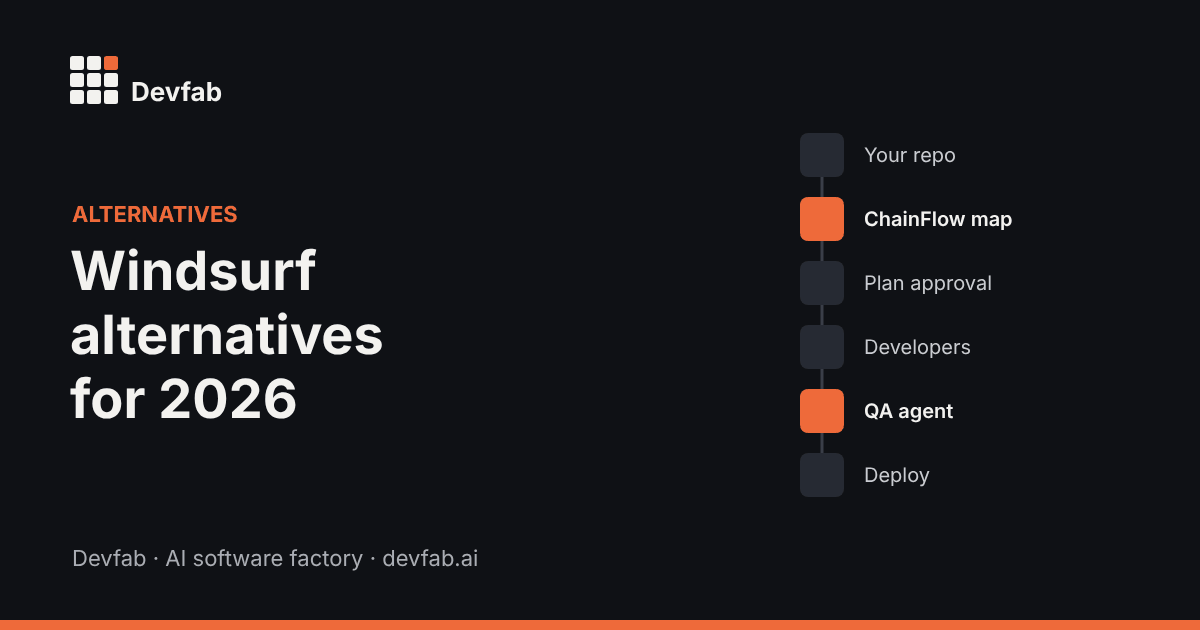
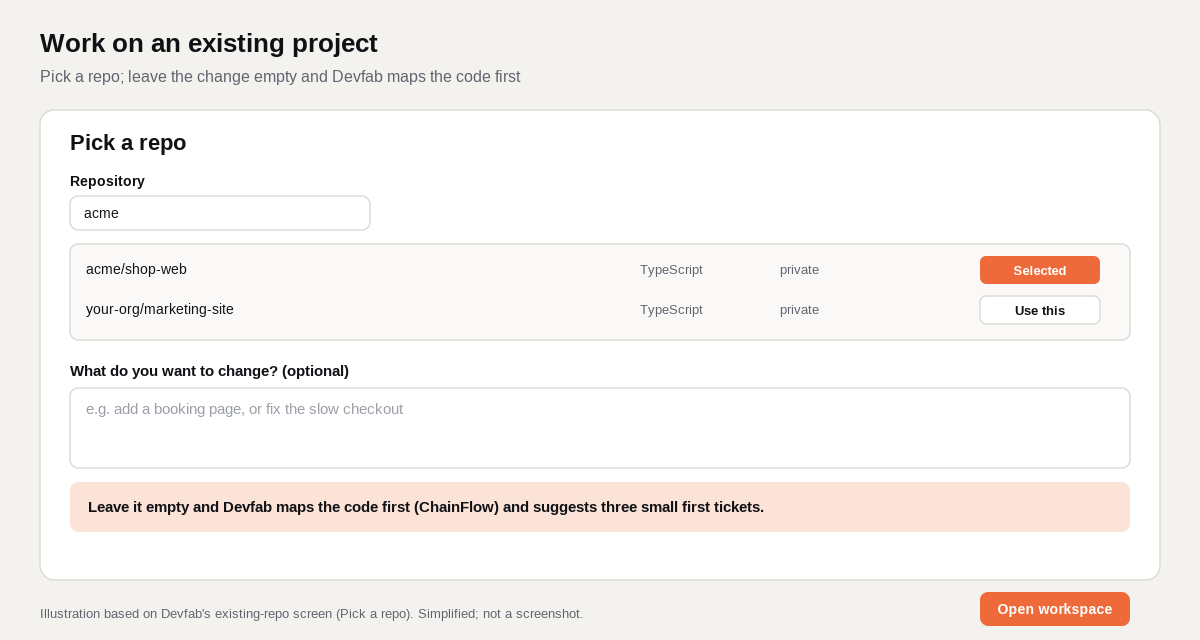
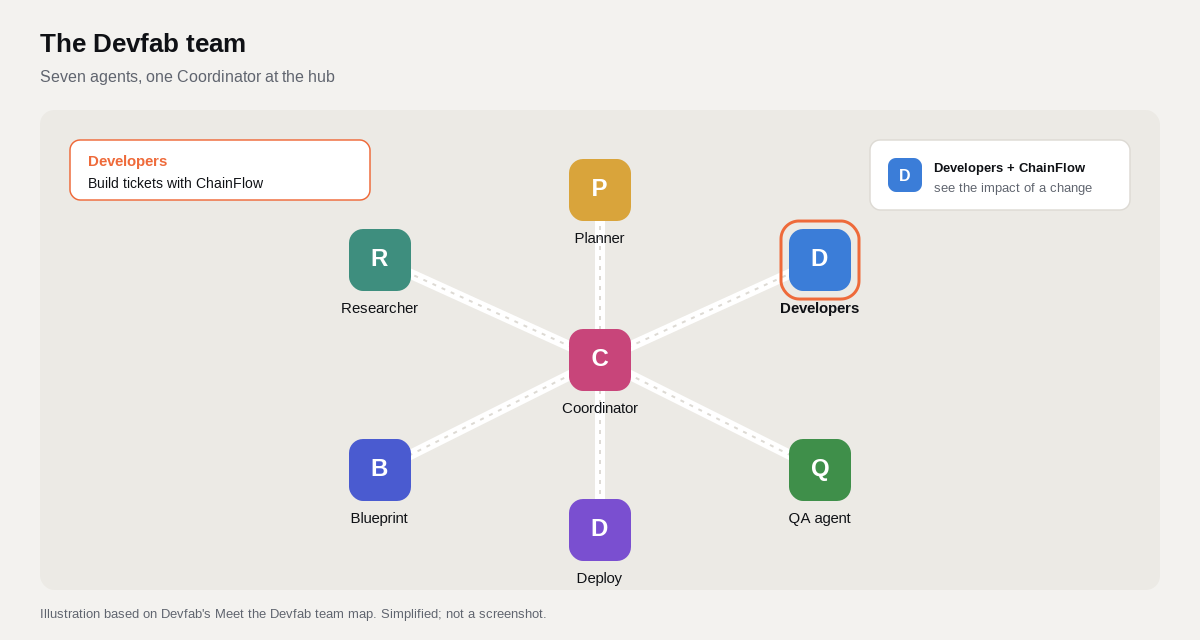
- ChainFlow on existing code. Connect a GitHub repo and leave the change box empty: Devfab maps the code first with ChainFlow and suggests three small first tickets. ChainFlow tracks which functions and APIs call each other and what is deployed, so developer agents see the impact of a change and don't break connected features.
- QA agent. It runs UI and flow tests (screens, buttons and user journeys clicked end to end) plus logic tests. With "QA agent · review before Done" on, work isn't marked Done until it's reviewed.
Behind the workspace is a team of seven agents: Researcher, Planner, Coordinator, Developers (with ChainFlow), Blueprint, QA agent and Deploy. A person approves the plan by default (Human in the loop), and you can switch to Auto in workspace settings. You can choose the model for each agent or keep Devfab's default.
Code lives in your own GitHub account (or your organization's), so developers can keep using Devin Desktop or Cursor on the same repo. You deploy to your own server. Cost is predictable and visible: it's logged after each run, per task and per project.
Devfab's honest limits:
- It's new and in Beta, with a much smaller community than any editor here.
- It isn't an editor for hands-on coding, and there's no inline completion.
- It has fewer integrations than Copilot or Devin.
- It needs a GitHub account.
- For a quick fix in a file you already have open, an AI editor is faster to reach for.
How to choose
- Happy with the new Devin Desktop? Stay.
- Want the closest AI editor? Cursor.
- On JetBrains or don't want to switch editors? GitHub Copilot.
- Want specs before code, inside an IDE? Kiro.
- Prefer an agent to an editor? Claude Code or Codex.
- Need whole projects researched, planned, approved, tested and deployed to your own server? Devfab. Read What is an AI software factory? for the full picture.
FAQ
Does Windsurf still exist?
The product does, under a new name. On June 2, 2026 Windsurf became Devin Desktop through a normal update. The editor, extensions, keybindings and settings carried over, and plans and pricing stayed the same.
What happened to Cascade?
Cascade, Windsurf's agent, was replaced by Devin Local and was scheduled to be retired on July 1, 2026. Teams with scripts or docs built around Cascade had to move them over.
What is the closest alternative to Windsurf?
Cursor. Both are VS Code-based AI editors that now center on running several agents, locally or in the cloud, with the code editor still one click away.
Can I use Windsurf (Devin Desktop) with Devfab?
Yes. Devfab keeps the code in your own GitHub account, so developers can open the same repository in Devin Desktop, Cursor or any other editor for hands-on work.
Read next
- What is an AI software factory?
- Devfab vs Windsurf
- Devin alternatives
- AI software factory vs AI coding tools
- Cursor vs Windsurf
Want more than a faster editor? Try the Devfab Beta
Sources (checked November 2026): Devin docs: Devin Desktop FAQ; DEV: Windsurf is now Devin Desktop; DEV: Cursor 3 review; GitHub Docs: Copilot in IDEs; GitHub Docs: About Copilot coding agent; Kiro: About; Kiro pricing; Claude Code overview; OpenAI Help: Codex; Cursor blog: Joining SpaceX.
Frequently asked questions
Does Windsurf still exist?
The product does, under a new name. On June 2, 2026 Windsurf became Devin Desktop through a normal update. The editor, extensions, keybindings and settings carried over, and plans and pricing stayed the same.
What happened to Cascade?
Cascade, Windsurf's agent, was replaced by Devin Local and was scheduled to be retired on July 1, 2026. Teams with scripts or docs built around Cascade had to move them over.
What is the closest alternative to Windsurf?
Cursor. Both are VS Code-based AI editors that now center on running several agents, locally or in the cloud, with the code editor still one click away.
Can I use Windsurf (Devin Desktop) with Devfab?
Yes. Devfab keeps the code in your own GitHub account, so developers can open the same repository in Devin Desktop, Cursor or any other editor for hands-on work.